

English
Accounting
The Akuntansi (Accounting) menu group holds the books themselves: chart of accounts, journals, general ledger, opening balances, period locking, and closing the fiscal year. Most journals do not need to be made by hand: invoices, bills, payments, and other documents create them automatically when issued.
Chart of accounts
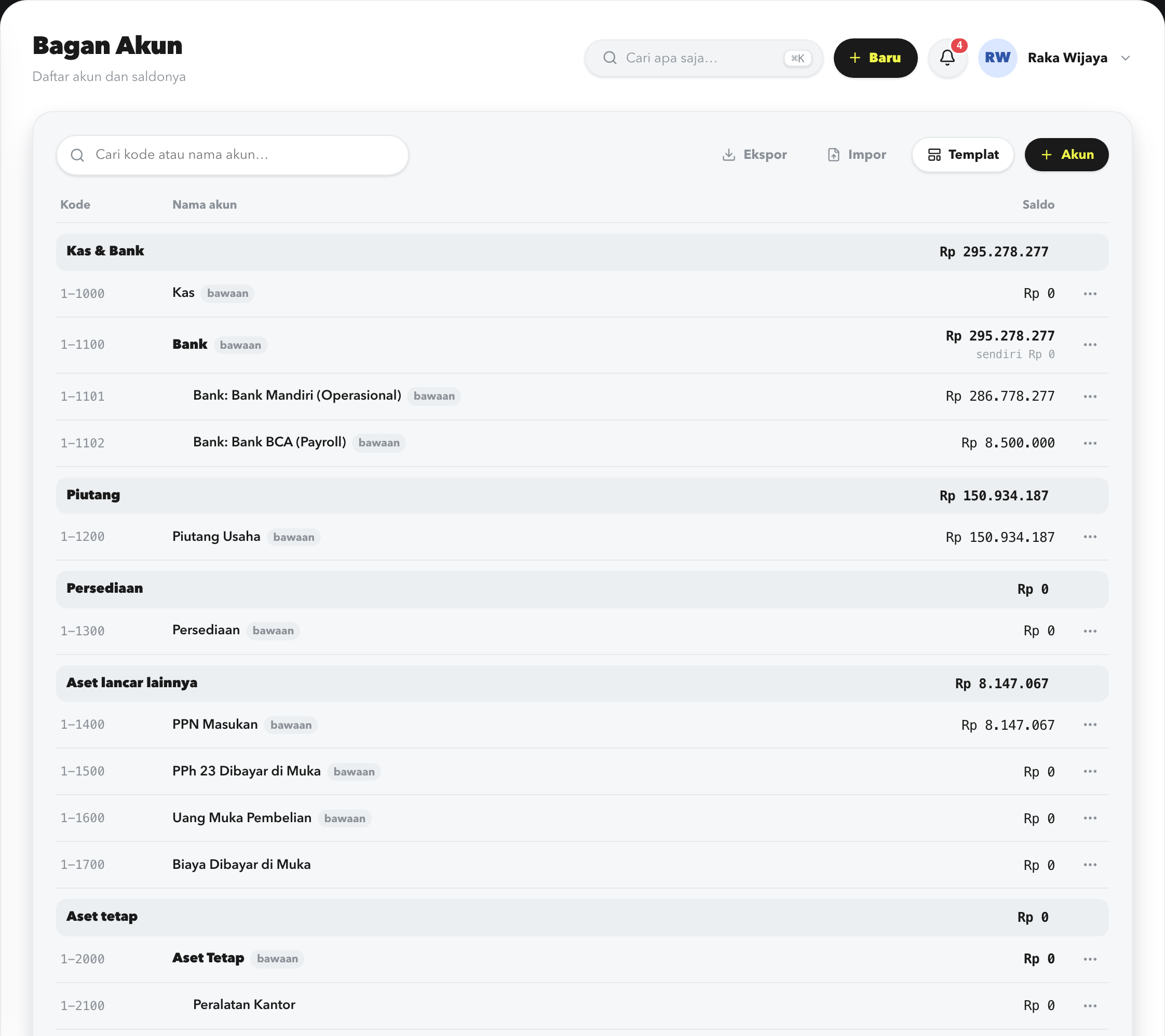
Open Akuntansi, Bagan Akun (Chart of Accounts). Accounts are arranged in levels: a parent account totals the sub accounts below it. The menu on each account row:
| Menu | Purpose |
|---|---|
| Buka buku besar (Open ledger) | The movements and balance of that account |
| Ubah (Edit) | Change its name, category, or group |
| Tambah sub akun (Add sub account) | Create an account under this one |
| Arsipkan (Archive) / Aktifkan lagi (Reactivate) | An archived account is no longer offered in forms, but its past transactions stay in reports |
Account fields: Kategori (Category), Kode (Code, for example 6-1100), Nama akun (Account name), Sub akun dari (Sub account of), Keterangan (Description), and Kelompok di laporan arus kas (Group in the cash flow report: operating, investing, financing, or cash). The Impor (Import) and Ekspor (Export) buttons move the chart from and to Excel; on import, a parent account may be created in the same file as long as its row is above its children.
An archived account is refused in every form, so archive an account that is no longer used rather than leaving it selectable by accident.
Journals
Akuntansi, Jurnal Umum (General Journal) lists every journal, from documents and made by hand. Each journal carries a source label (Manual, Faktur, Tagihan, Pembayaran, Biaya, Kas & bank, Transfer, Penyusutan, Gaji (Kreativstaff), Penjualan kasir (Tokora), and so on) and its status: Terposting (Posted) or Dibatalkan (Cancelled). A journal's page shows whether it is Seimbang (Balanced), and a Dibuat dari (Created from) link to its source document.
Making a manual journal
For accruals, adjustments, or corrections that have no document:
- + Baru, Jurnal umum baru (New general journal).
- Fill in Tanggal (Date) and Keterangan (Description), then the journal lines: account, debit or credit, a line note, and project, department, or branch if needed.
- Choose Posting, or Simpan draf (Save draft) if you are not sure yet.
A journal must balance (debit equals credit) and its date must not be in a locked period; Finara refuses what breaks either. Ctrl+Enter posts from the form.
Three helpers in the form:
- Pakai templat (Use template) fills the lines from a template you saved, and Simpan sebagai templat (Save as template) keeps this journal for reuse (for example "Monthly depreciation").
- Balik otomatis (Auto-reverse) creates a reversing journal on the Tanggal jurnal balik (Reversal date), usually the start of the next month. Useful for accruals that apply to one period only.
- Duplikat (Duplicate, on a journal's page) opens a new journal form already holding a copy of that journal.
Draf & Templat (Drafts & Templates) holds journals not yet posted and journal templates. Jurnal Berulang (Recurring Journals) makes a schedule for journals that post themselves each period (for example amortising a prepaid cost), with the statuses Berjalan (Running), Dijeda (Paused), and Selesai (Ended).
Correcting a journal
A posted journal is not deleted. For a manual journal, its page has three buttons:
| Button | Result |
|---|---|
| Ubah (Edit) | Cancels that journal and creates its replacement. Both stay visible, and the new one points to the one it replaced |
| Balik (Reverse) | Creates a reversing journal (debit and credit swapped) on the date you choose. The original stays in force. For reversing an accrual at the start of the month |
| Batalkan (Cancel) | Creates a reversing journal on that journal's date (or today if its period is locked). Both stay visible in the ledger |
A journal created by a document (invoice, bill, payment, depreciation, and the like) is corrected through its document, not here: cancelling the document creates its reversing journal.
General ledger
Akuntansi, Buku Besar (General Ledger) shows movements and balance per account for the period you choose, with a running balance. The same Buku Besar report is in Reports and can be exported.
Opening balances
Akuntansi, Saldo Awal (Opening Balances) is used when the books are moved from another system. The full explanation is in Setting up Finara.
Lock date and closing the books
Open Akuntansi, Tutup Buku (Close Books). Two things are set here, and only holders of the period-close permission (usually the owner or finance admin) can change them.
The lock date
Transactions dated up to the lock date cannot be created or posted. Lock each month once its reports are checked, so reported figures cannot change silently. A document in a locked period can still be cancelled if needed, but its reversing journal is dated today, not its original date, so the reported period does not shift.
- Fill in Kunci sampai (Lock until), or click Akhir bulan lalu (End of last month), then Simpan (Save).
- Hapus kunci (Remove lock) opens it again (not available once a fiscal year has been closed up to that date).
The fiscal year
Tutup buku (Close books) moves the year's net profit or loss to Laba Ditahan (Retained Earnings) with one closing journal on the last day of the fiscal year, and locks that year.
- Years are closed in order, and only the last closed year can be reopened (Buka kembali). Reopening asks for a reason, recorded in the history, reverses the closing journal, and returns the lock date to what it was before.
- The closing journal does not affect that year's Profit and Loss or Cash Flow, but it is reflected in the Balance Sheet and Trial Balance (the profit is already in Retained Earnings).
- A year that cannot be closed names the reason beneath its row.
Activity log
Akuntansi, Log Aktivitas (Activity Log) records who changed what in the books, and when: created, edited, posted, approved, cancelled, and so on. The log only contains documents you are allowed to open. A single document's history is also in the Riwayat (History) panel on its page.
App links
Akuntansi, Tautan Aplikasi (App Links) books payroll, register sales, and deals from other apps. See Links to other apps.