

English
Cash and bank
The Kas & Bank (Cash & Bank) screen handles accounts, money in and out that is not an invoice or bill, transfers between accounts, and matching your records against the bank statement.
Accounts
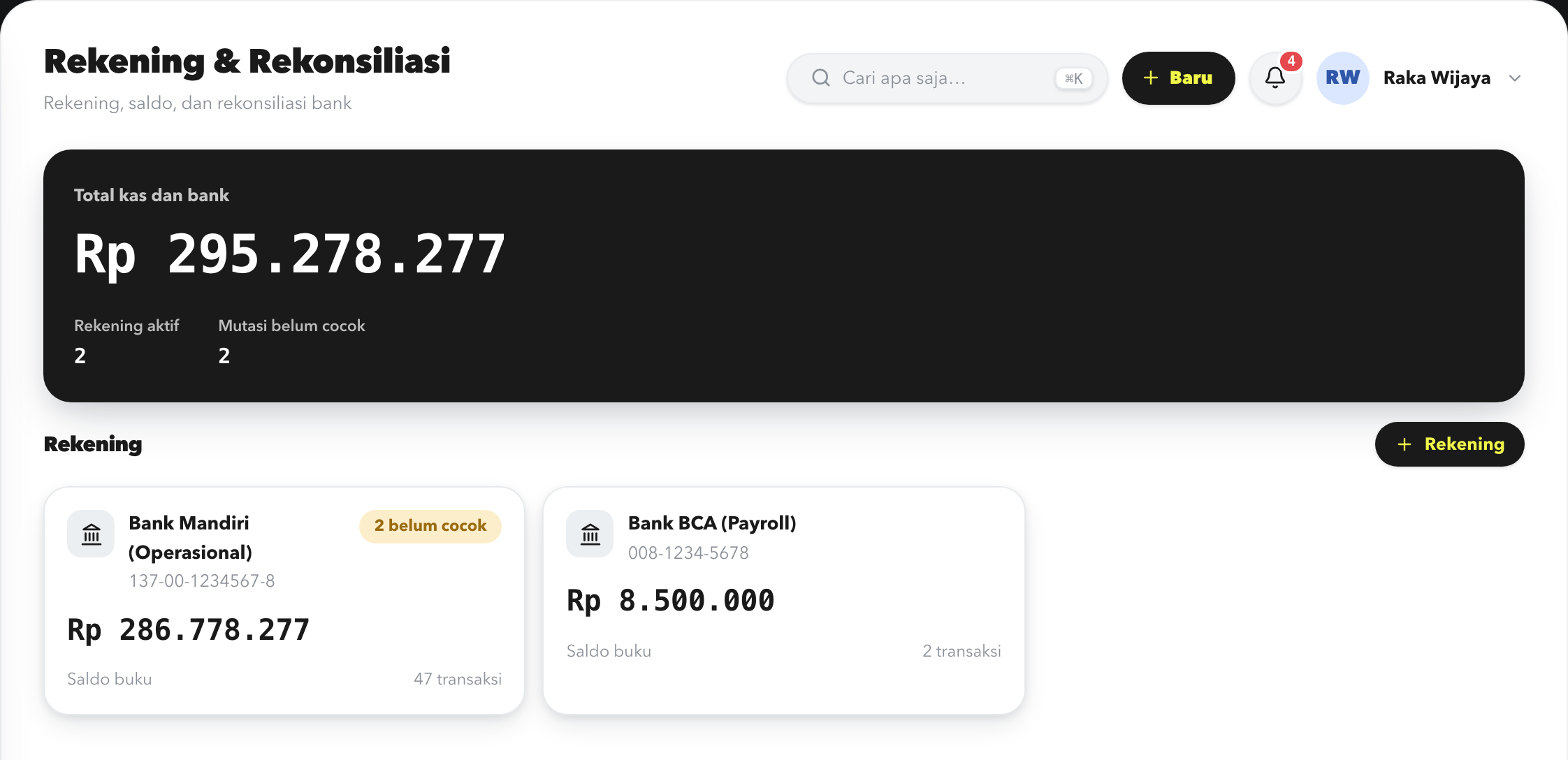
Open Kas & Bank, Rekening & Rekonsiliasi (Accounts & Reconciliation). This page lists every account with its balance. The kinds are Kas (Cash), Bank, E-wallet, and Kartu kredit (Credit card). When adding an account, fill in the Saldo awal (Opening balance) and its date (for a credit card, Utang kartu saat ini, Card debt at present); moving everything from another system at once uses Opening Balances.
An account's balance always equals its book account: there are not two figures to reconcile inside Finara. What gets matched is your records against the bank statement, and that is what reconciliation below does.
An account no longer in use can be switched off with the Rekening aktif (Account active) switch in its form; an inactive account takes no new money.
Receive money, send money, transfer
Three ways to record money that does not go through an invoice or bill. All are in the Transaksi baru (New transaction) menu on an account's page, or under + Baru:
| What happened | Choose |
|---|---|
| Money in outside an invoice (interest, capital contribution, other income) | Terima uang (Receive money) |
| Money out outside a bill (tax, asset purchase, cash withdrawal) | Kirim uang (Send money) |
| Moving money between two of the company's own accounts | Transfer antarrekening (Transfer between accounts) |
Terima uang and Kirim uang use lines like an invoice: the counter account, amount, tax, and project. Transfer antarrekening can carry a transfer fee. The history is under Kas & Bank, Terima & Kirim Uang (Receive & Send Money) and Kas & Bank, Transfer. Press Ctrl+Enter to save from the form.
Importing bank statements
Bank statements enter Finara through a file, not a live connection to the bank.
- Download the statement from internet banking as Excel or CSV.
- Open the account, click Impor mutasi (Import statement), and send the file.
- Check the preview: how many lines are new and how many baris dilewati (lines skipped). Finara reads the columns itself. If a date is read wrongly, choose the Format bank (Bank format); the date, description, and amount columns can also be mapped by hand.
- Click Impor. Nothing is saved until you press Impor.
The same line does not enter twice: Finara recognises lines already imported, so it is safe to import a file whose period overlaps an earlier one.
If a file is refused
Finara judges a file by its contents, not its name. PDF files and the old Excel format (.xls) are not accepted: save again as .xlsx or CSV from internet banking or Excel.
Reconciliation
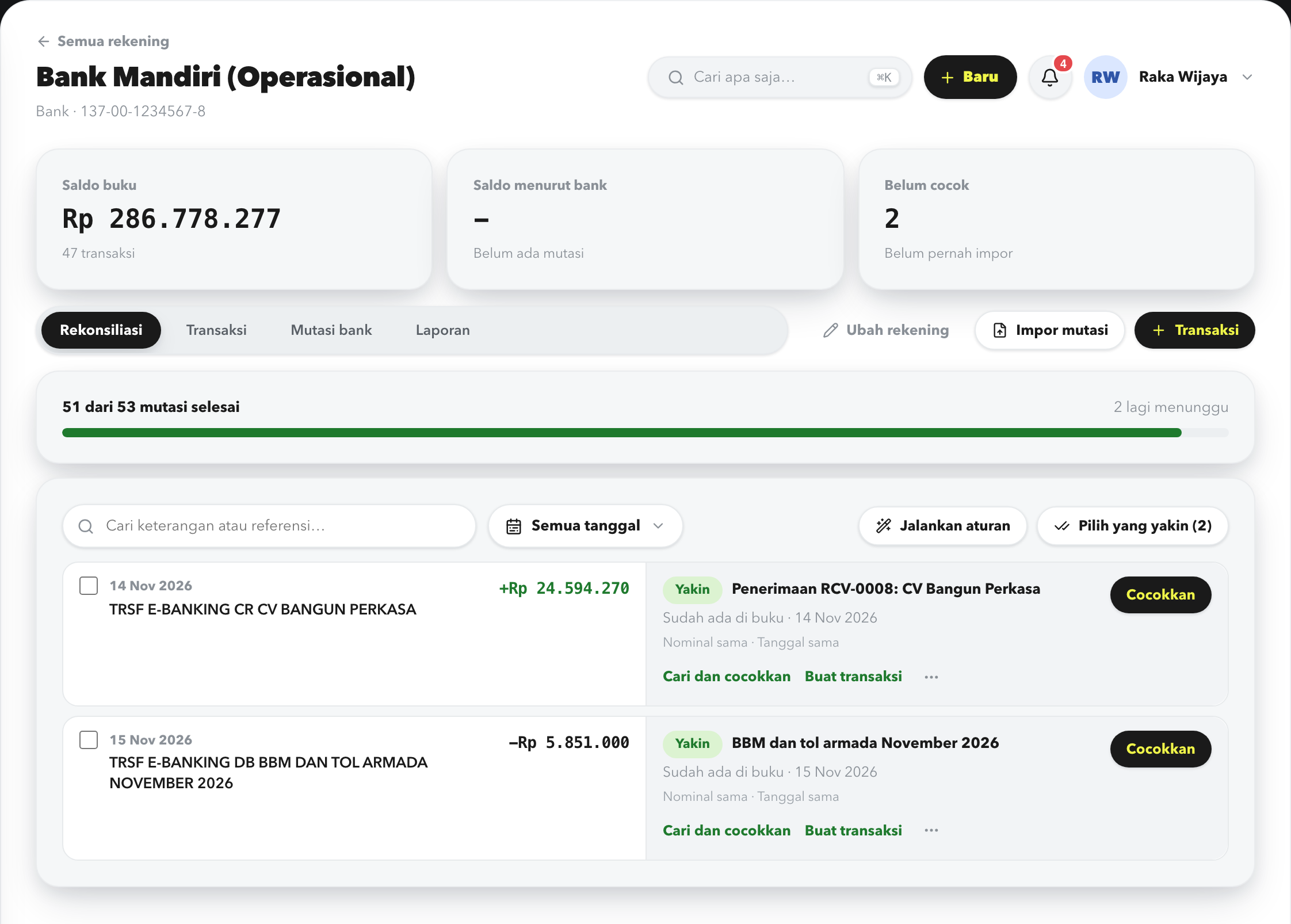
On an account's page, the Rekonsiliasi (Reconciliation) tab shows the queue of statement lines not yet matched. For each line Finara looks for a suggestion: the same amount, a nearby date, a reference number, and the customer or supplier name. Suggestions are marked Yakin (Sure), Mungkin (Maybe), or Lemah (Weak), with the reasons beneath.
| Button on the suggestion | Meaning |
|---|---|
| Lunasi (Settle) | A money-in line is recorded as payment of a customer invoice |
| Bayar (Pay) | A money-out line is recorded as payment of a supplier bill |
| Cocokkan (Match) | The line is matched with a transaction already in the books |
| Catat (Record) | The line is recorded according to a bank rule (see below) |
If the first suggestion is not right, the small number beside it (for example 1/3) opens the next one. Other choices on each line:
- Cari dan cocokkan (Search and match): look for the right transaction yourself.
- Buat transaksi (Create transaction): record the line as a new transaction (bank fees, interest, and the like).
- Aksi lain (More actions): Catat sebagai transfer (Record as a transfer, when it is a move between your own accounts), Pisah mutasi (Split the line, one line for several purposes), Buat aturan dari mutasi ini (Create a rule from this line), and Abaikan (Ignore).
Several suggestions can be accepted at once: tick the rows, then click Terima saran (Accept suggestions). An empty queue reads Semua mutasi sudah beres (All statement lines are settled).
Reconcile regularly
Reconciliation is lightest when done weekly. Lines that pile up for months make the suggestions less sharp and manual searching longer.
The reconciliation report
The Laporan (Report) tab compares the bank statement balance (filled from the last statement line, or typed by you) with the book balance as of the date you choose, and shows the difference. A difference of zero means your records and the bank are in step.
Cancelling a matched transaction
A transaction already matched to a bank statement line cannot be cancelled until its match is released. This is deliberate: it stops figures that agree with the bank from changing silently.
Bank rules
Recurring statement lines, such as bank admin fees or interest, do not need to be recorded one by one. Open Kas & Bank, Aturan Bank (Bank Rules), or choose Buat aturan dari mutasi ini from the queue.
| Field | Purpose |
|---|---|
| Nama aturan (Rule name) | For example "Bank admin fee" |
| Keterangan mengandung (Description contains) | A word in the statement description, for example BIAYA ADM |
| Arah (Direction) | Money in, money out, or both |
| Di rekening (In account) | One account, or all |
| Nominal dari and Sampai (Amount from, up to) | Value limits, if needed |
| Akun (Account), Pelanggan or Pemasok (opsional), PPN (VAT) | How the transaction is recorded. VAT is taken as already included in the statement amount |
| Catat otomatis (Record automatically) | When on, a matching line is recorded straight away without asking, unless the books already hold the same amount within 7 days. When off, the rule only appears as a suggestion (Catat) you accept yourself |
| Aturan aktif (Rule active) | Switches the rule off without deleting it |
Petty cash
An account of the Kas kind can be made a petty cash fund with a fixed float: in the account's form, fill in Dana tetap kas kecil (Petty cash float) and Diisi ulang dari (Replenished from) (leave the float empty if it is not petty cash). The Kas kecil (Petty cash) tab shows the Dana tetap (Float), Saldo (Balance, as a percentage of the float), Perlu diisi ulang (To be topped up), and Isi ulang terakhir (Last replenishment). A balance below 20% of the float is marked Menipis (Running low), and appears on the Dashboard as something needing action.
Isi ulang (Replenish) is a transfer from a source account (for example the bank) to the petty cash, at most the amount missing from the float. The petty cash holder accounts for the spending through the Pertanggungjawaban Kas Kecil (Petty Cash Accountability) report in Reports: the last replenishment is the edge of its window.