

English
Tax
The Pajak (Tax) menu group has four pages: PPN (VAT), Faktur Pajak (Tax invoices), PPh (Income tax), and Kalender Pajak (Tax calendar). Together they prepare tax data from the invoices, bills, and payments you have recorded: VAT periods, the list of tax invoices, withholding slips, and the deadline calendar.
Finara prepares, Coretax issues
Finara does not issue tax invoice numbers or withholding slip numbers. Only Coretax gives them: Finara prepares the file to upload, then stores the number you receive. Deciding tax treatment and filing returns remain the responsibility of your company and your tax adviser.
Tax figures are worked out from documents that have been issued. Book every invoice and bill of a period before closing that period.
Before you start
- In Pengaturan (Settings), switch on Perusahaan Kena Pajak (PKP) (VAT-registered company) if your company is VAT-registered. When it is off, tax invoices are not issued and XML cannot be downloaded.
- The seller details on a tax invoice (NPWP and NITKU) come from the company profile in the portal. The Profil faktur pajak (Tax invoice profile) button on the Faktur Pajak page shows and completes what is used.
- Choose the right tax code on each invoice and bill line. Finara's default VAT and income tax codes can be seen and set in Settings.
VAT
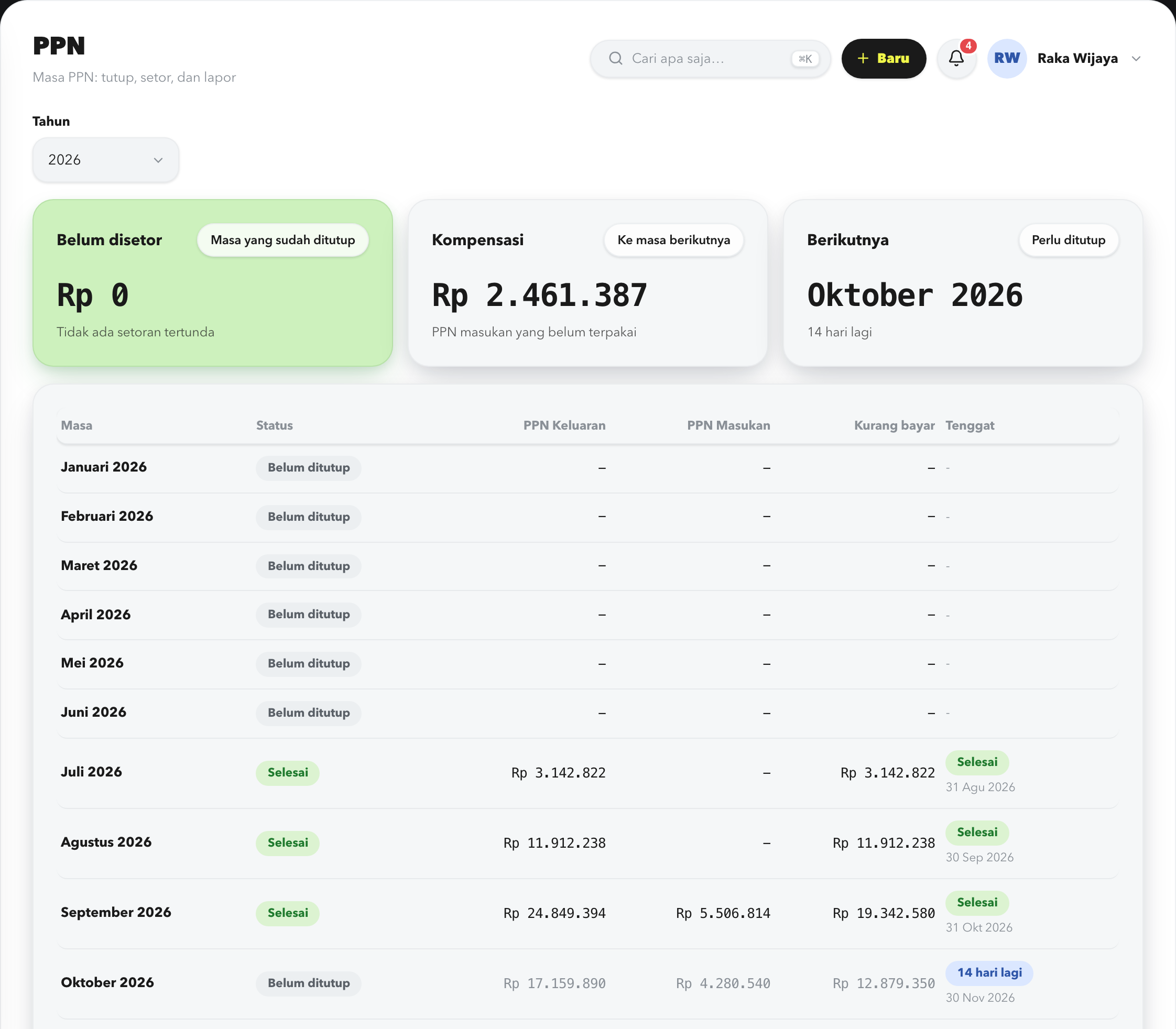
Open Pajak, PPN. This page shows one row per period (month): PPN Keluaran (Output VAT), PPN Masukan (Input VAT), Kurang bayar (Payable), and Tenggat (Deadline). The cards above it show Belum disetor (Not yet paid in, periods already closed), Kompensasi (Carried forward, input VAT not yet used, brought to the next period), and the Berikutnya (Next) period.
A period's status is Belum ditutup (Not closed), Menunggu setoran (Awaiting payment), or Selesai (Done). A period closed with nothing to pay is done at once.
The flow per period:
- Tutup masa (Close period). Finara works out the output VAT and input VAT and makes one closing journal: output VAT and the credited input VAT are settled, and the difference becomes VAT Payable (Hutang PPN). You can change the PPN Masukan yang dikreditkan (Input VAT credited) and the Tanggal jurnal penutupan (Closing journal date, usually the last day of the period). Input VAT from bills without a tax invoice number is not credited unless you choose to include it.
- Catat setoran (Record payment). After paying the state treasury, choose Dibayar dari rekening (Paid from account), Tanggal setor (Payment date), NTPN, and Kode billing (Billing code). The payment is recorded as money out of that account to VAT Payable: it takes part in bank reconciliation like any other payment.
- File. Record the Tanggal dilaporkan (Date filed) and the Nomor bukti penerimaan elektronik (BPE) (Electronic receipt number) of your VAT return.
A few things to know:
- Close forward, reopen backward. Periods are closed in order; Buka kembali masa (Reopen period) starts from the last one closed, and is refused while that period still has a payment (cancel it first with Batalkan setoran, Cancel payment).
- Carry-forward makes no journal: unused input VAT stays in the Input VAT account and counts in the next period.
- A period without output VAT is marked done without a journal, but the nil return is still filed.
- A past period with no transactions or VAT in the books is not marked late: Finara only demands periods that are visible in your books.
The Rekap PPN Masa and Daftar Faktur Pajak Masukan reports (in Reports, the Tax group) detail one period's contents for preparing the return.
Output tax invoices
The Faktur Pajak (Tax invoices) page is a view over your sales invoices that are ready to become tax invoices. The list is recalculated from the invoices every time it is opened, so nothing has to be copied twice. The flow:
- Unduh XML (Download XML) of the ready invoices (or pick several and Unduh XML). The file follows the DJP's Output Tax Invoice import format.
- Upload it in Coretax: Faktur Pajak Keluaran, Impor Data, then issue.
- Record the number Coretax gave: Catat nomor (Record number) on the invoice row, or Impor nomor dari Coretax (Import numbers from Coretax) for many at once. Recorded one wrongly? Hapus nomor (salah catat) (Remove number, recorded by mistake).
An invoice that cannot be exported yet says why on its row. Worth knowing:
- A final invoice that deducts a down payment is not exported: its tax invoice is made directly in Coretax.
- The VAT and tax base per line are split so that they add up to the figure in your journal, because Coretax checks per line.
- A buyer with an NPWP is sent with the NPWP; a buyer with only an NIK is sent with the NIK and an address is required.
Income tax and withholding slips
The PPh (Income tax) page has a Masa (Period) picker and four parts:
| Part | What it holds |
|---|---|
| Bukti potong (Withholding slips) | Tax you withhold from suppliers (made automatically at payment, see Purchasing). Choose the Kode Objek Pajak (Tax object code) for each slip, Unduh XML, upload it to e-Bupot Unifikasi in Coretax, issue, then record the slip's number |
| Setoran dan lapor (Payments and filing) | Catat setoran for income tax per period and type, with NTPN and billing code, then record the filing of the Unified Withholding Tax return |
| Diterima (Received) | Withholding slips customers gave you (tax they withheld from their payments) |
| Lainnya (Other) | Withholding slips you record yourself outside bills, including PPh 21 |
Worth knowing:
- The e-Bupot file holds PPh 23, PPh 4(2), and final income tax. PPh 21 and PPh 26 are not part of that file.
- One period and tax type may be paid in several instalments, but never beyond what is still unpaid. A cancelled payment makes a reversing journal, and a payment already matched to a bank statement line cannot be cancelled until its match is released.
- A slip already issued in Coretax can no longer have its data changed; one only downloaded becomes ready again if its data is changed.
Calendar
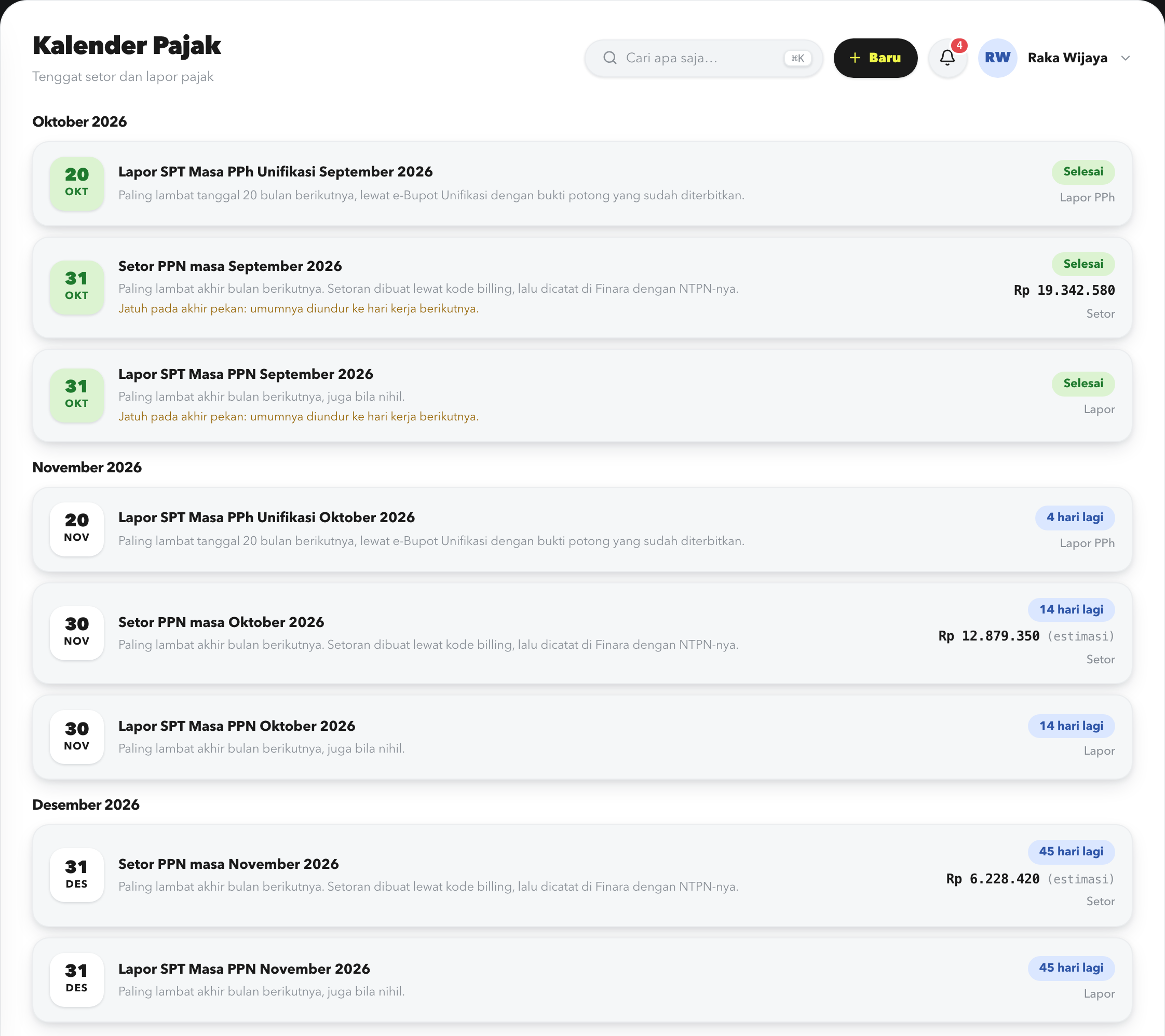
The Kalender Pajak (Tax calendar) page shows deadlines for the next six months and those already missed but not done. The deadlines, by regulation:
| Deadline | When |
|---|---|
| Pay VAT and file the VAT return | The end of the month after the period |
| Pay income tax | The 10th of the following month |
| File the Unified Withholding Tax return | The 20th of the following month |
| Annual return | The end of the fourth month after the fiscal year ends (30 April for a calendar fiscal year) |
Missed deadlines are grouped at the top under Terlambat (Late), then the deadlines of the months ahead. A deadline counts as done according to what you have closed, paid, and filed in Finara. A deadline falling on a weekend is flagged: it is usually moved to the next working day, but Finara does not know national holidays, so the DJP's official calendar has the final word.
Deadlines that are close (7 days ahead) and missed ones also appear in Finara's bell, for companies that use VAT in their books.