

English
Finara guide


Finara is the finance and accounting module: recording sales and purchases, keeping the books, reconciling the bank, preparing tax, and producing financial statements.
This guide explains how to use Finara
It shows the screens, buttons, and workflows. It is not accounting or tax guidance: your chart of accounts, tax treatment, and bookkeeping policy remain your decisions, made with your accountant or tax adviser.
Finara carries out what you choose, and refuses what breaks the basic rules of bookkeeping, for example an unbalanced journal or a transaction in a locked period.
Finara's screens are in Indonesian
Every label in this guide is written as it appears on screen, followed by its English meaning in italics the first time it appears on a page, for example Catat pembayaran (Record payment).
Where to start
| You want to | Read |
|---|---|
| Set up the books for the first time | Setting up Finara |
| Bill customers and record their payments | Sales |
| Record supplier bills, approve, and pay them | Purchasing and expenses |
| Manage accounts and match bank statements | Cash and bank |
| Make journals, lock periods, close the year | Accounting |
| See the balance sheet, profit and loss, cash flow, and more | Reports and dashboard |
| Prepare VAT, tax invoices, and withholding slips | Tax |
| Manage stock, fixed assets, budgets, and projects | Inventory, assets, budgets, projects |
| Book payroll, register sales, and deals from other apps | Links to other apps |
| Work faster with the keyboard | Working faster |
For whom
What you can do in Finara depends on the role your company admin gave you. A menu you cannot see is not broken: your role simply does not include it.
| Role | What they do |
|---|---|
| Finance Admin | Full access: sales, purchasing, accounting, tax, bank, assets, budgets, settings, and period locking |
| Finance Approver | The finance manager: approves or rejects supplier bills, and sees almost every screen |
| Accountant (Akuntan) | Journals, ledger, reports, tax, cash and bank, expenses, fixed assets, and budgets; sees sales and purchasing |
| Sales Staff (Staf Penjualan) | The receivables side: invoices, quotes, credit notes, receipts, and customers |
| Purchasing Staff (Staf Pembelian) | The payables side: bills, payments, debit notes, expenses, and suppliers |
| Finance Viewer | Read-only access to sales, purchasing, and reports |
An approver does not approve their own bills
When there is another approver in the company, a bill you created yourself must be approved by someone else. This is a basic financial control, and Finara enforces it rather than relying on a verbal agreement.
How Finara works
A few things hold on every screen. Knowing them up front saves many questions.
- What has been issued is not deleted. Posted invoices, bills, and journals are cancelled, not deleted. Cancelling creates a reversing journal, and both stay visible in the ledger and in the document's history. Only drafts can be deleted.
- Document numbers run in sequence and are never used twice. A draft takes its number when saved, so a deleted draft leaves its number used. If your number series must stay tight, delete drafts only when you need to.
- A locked period accepts no transactions. Lock each month once its reports are checked, so reported figures cannot change silently. See Accounting.
- One calculation rule. Totals on screen, in the PDF, and in the journal are worked out with the same rule, including discounts, tax per tax code, and rounding.
- Every document has a history. Who created, changed, approved, or cancelled it, and when, is recorded in the Riwayat (History) panel and in the Log Aktivitas (Activity log).
- Every report figure can be traced. Click a figure in a report to open the account's ledger, then the documents behind it.
Main screens
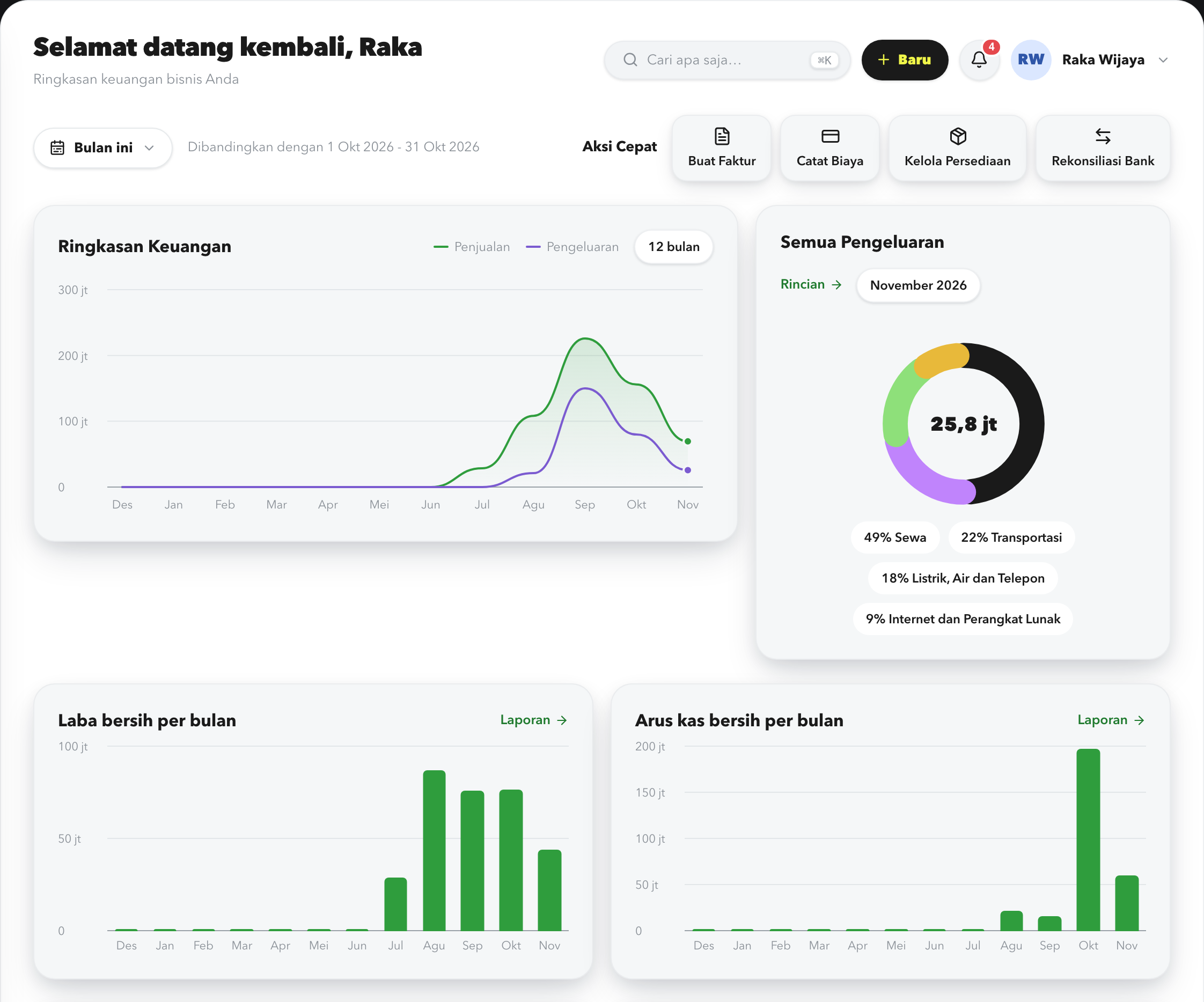
| Menu group | What it holds |
|---|---|
| Ringkasan (Overview) | Dashboard and the Siap Dipakai (Ready to use) checklist |
| Penjualan (Sales) | Invoices, Quotes, Receipts, Credit Notes, Recurring Invoices |
| Pembelian (Purchasing) | Bills, Approvals, Payments, Debit Notes, Recurring Bills, Expenses |
| Kontak & Produk (Contacts & Products) | Customers and suppliers, the Products & Services catalogue |
| Kas & Bank (Cash & Bank) | Accounts & Reconciliation, Receive & Send Money, Transfers, Bank Rules |
| Akuntansi (Accounting) | General Journal, Chart of Accounts, General Ledger, Drafts & Templates, Recurring Journals, Opening Balances, Close Books, App Links, Activity Log |
| Persediaan (Inventory) | Stock, Stock Adjustments, Warehouse Transfers, Stock Counts, Warehouses, Goods & Bills of Materials, Manufacturing |
| Aset & Anggaran (Assets & Budget) | Fixed Assets, Depreciation, Budgets |
| Proyek & Dimensi (Projects & Dimensions) | Projects, Departments, Branches |
| Pajak (Tax) | VAT, Tax Invoices, Income Tax, Tax Calendar |
| Laporan (Reports) | The report centre |
| Pengaturan (Settings) | Bookkeeping, numbering, terms, document appearance |
Finara is not the same as Kreativlo billing
Two things easily confused:
| Finara | Kreativlo billing | |
|---|---|---|
| Records | Your company's receivables and payables | What you pay to subscribe to Kreativlo |
| Found in | The Finara module | Portal, Billing |
A Kreativlo subscription invoice does not enter Finara's books by itself. If it needs recording, record it like any other supplier bill.
Relationship to other apps
Finara can book the work of other Kreativlo apps when your company subscribes to both and you switch it on: payroll from Kreativstaff becomes one journal entry, register sales from Tokora become one journal entry, and a deal won in Kanari becomes a draft invoice. All of them are off until you switch them on.
Data movement between modules beyond these is not yet automatic. Integration status between modules →