

English
Setting up Finara
Before the first invoice, Finara needs to know which accounts you use, where your money is kept, and who your customers and suppliers are. The Siap Dipakai (Ready to use) checklist guides you through it.
The Siap Dipakai checklist
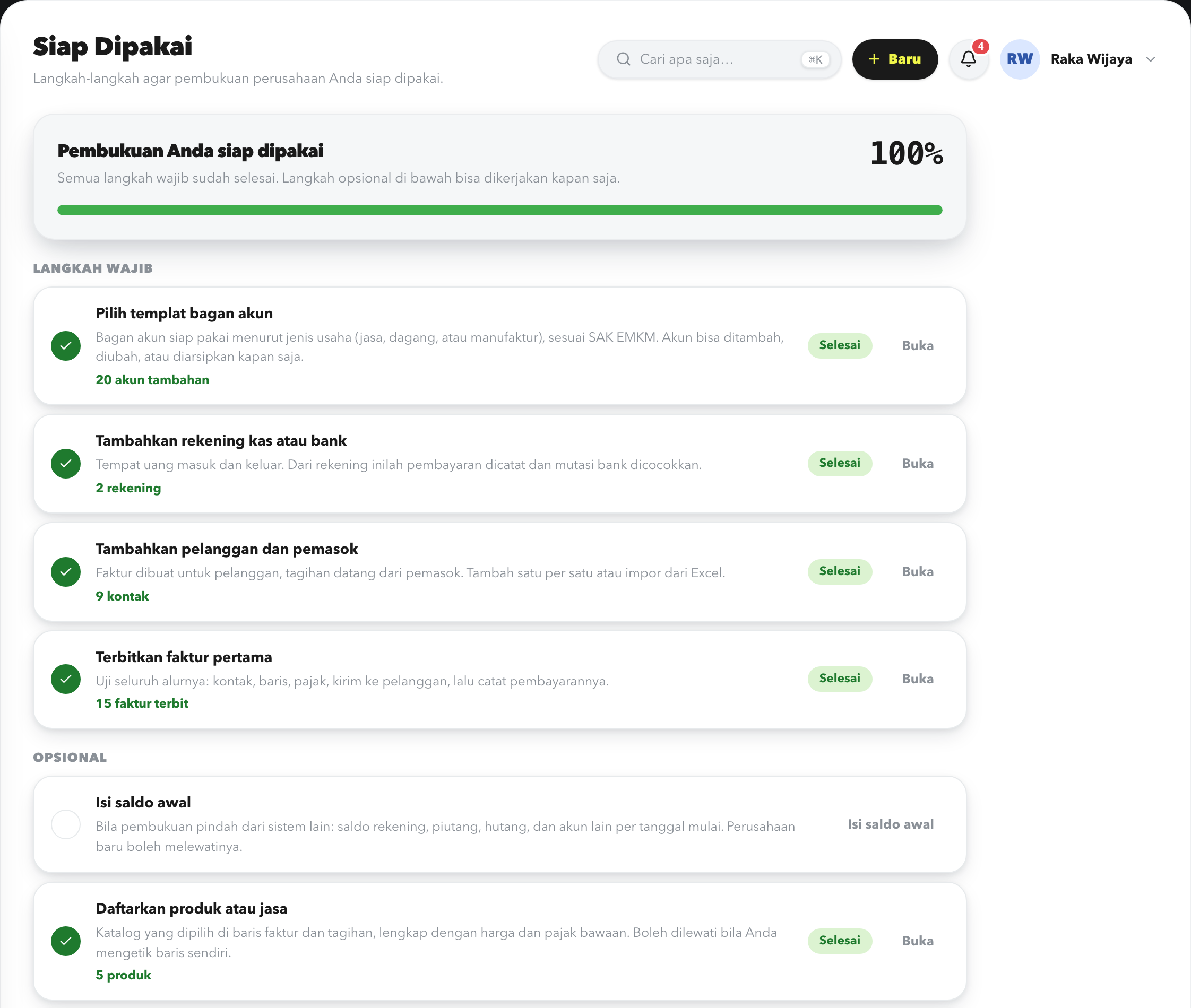
Open Ringkasan (Overview), Siap Dipakai. The same list appears as a card on the Dashboard until you close it. Each step has a button that takes you to its screen, and a step whose data already exists is marked done by itself.
| Step | Required | Done in |
|---|---|---|
| Pilih templat bagan akun (Choose a chart-of-accounts template) | Yes | Akuntansi, Bagan Akun |
| Tambahkan rekening kas atau bank (Add a cash or bank account) | Yes | Kas & Bank |
| Tambahkan pelanggan dan pemasok (Add customers and suppliers) | Yes | Kontak |
| Terbitkan faktur pertama (Issue the first invoice) | Yes | Penjualan, Faktur |
| Isi saldo awal (Enter opening balances) | Can be skipped | Akuntansi, Saldo Awal |
| Daftarkan produk atau jasa (Register products or services) | Can be skipped | Produk & Jasa |
| Rapikan tampilan dokumen (Tidy up document appearance) | Can be skipped | Pengaturan |
Steps that can be skipped do not hold the company back from being ready. A newly founded company usually has no opening balances, and someone who types their own lines does not need a product catalogue.
1. Chart of accounts
The chart of accounts is the list of accounts your books use. In Akuntansi (Accounting), Bagan Akun (Chart of Accounts), pick a template for your type of business: services, trading, or manufacturing, following SAK EMKM. Accounts can be added, edited, and archived at any time, and the chart can be imported from Excel.
Build the chart of accounts with your accountant, before the first transaction
The chart is easiest to build before any transactions exist. An account that is already in use is best archived, not deleted: an archived account cannot be chosen for new transactions, but its history stays intact and old reports stay comparable.
2. Cash and bank accounts
In Kas & Bank (Cash & Bank), add the places your money sits. There are four kinds of account:
| Kind | For |
|---|---|
| Kas (Cash) | Physical cash, including petty cash |
| Bank | Bank accounts |
| E-wallet | Digital wallets and QRIS providers |
| Kartu kredit (Credit card) | Its balance is negative while you owe; its kind cannot be changed to another, or the other way round |
Payments are recorded against these accounts, and bank statements are matched to them. See Cash and bank.
3. Opening balances
This step is for companies moving from another system. A new company may skip it.
Open Akuntansi, Saldo Awal (Opening Balances). Enter what the company owns and owes at the start date: account balances, customer receivables, supplier payables, and other accounts. Everything is recorded against Ekuitas Saldo Awal (Opening Balance Equity); once everything is filled in, including capital and retained earnings, that account is zero. The Belum dijelaskan (Not yet explained) box shows what is left.
The opening balance date
Use the last day before the first transaction recorded in Finara, for example 31 December last year. The whole opening balance is saved as one journal. Opening receivables and payables are recorded as opening-balance documents: they can only be settled or cancelled, not sent or duplicated.
4. Customers and suppliers
In Kontak (Contacts), add customers and suppliers one by one, or import them from Excel with Unduh templat Excel (Download the Excel template). The template holds the recognised columns, what each column means, example entries, and your company's account names, tax codes, and payment terms. A file you made yourself is also accepted as long as its header row uses the same column names.
In invoice and bill forms you can also add a contact right from the contact picker (Tambah pelanggan or Tambah pemasok).
5. Products and services (optional)
Produk & Jasa (Products & Services) is the catalogue you pick from in invoice and bill lines, with default prices and taxes. Fill it in if you often bill the same things; otherwise type the lines yourself. Goods whose stock is tracked are covered in Inventory.
6. Document appearance (optional)
In Pengaturan (Settings), the document appearance section sets what is printed on invoices and quotes:
- Warna aksen (Accent colour), checked so it stays readable on white paper.
- Logo: only a switch for whether to print the company logo. The logo itself is managed in the Kreativlo portal (Branding); without one there, documents carry the company name only.
- Tanda tangan (Signature): an image (PNG, JPG, or WebP on white paper or a transparent background) with the signer's name and title.
- Rekening pembayaran (Payment accounts): choose the bank or e-wallet accounts printed under unpaid invoices and shown on the online invoice page. Add the accounts in Cash & Bank first.
The company letterhead and address come from the company profile in the portal, so nothing is entered twice.
7. Settings worth checking
Open Pengaturan. These decide most of how Finara behaves:
| Setting | What it means |
|---|---|
| Tahun buku mulai bulan (Fiscal year starts in month) | The start of the fiscal year. Reports without a period use the current fiscal year |
| Perusahaan Kena Pajak (PKP) (VAT-registered company) | Decides whether tax invoices are issued and VAT is booked |
| Batas persetujuan tagihan (Bill approval limit) | Bills below this value are approved automatically when submitted. Empty or zero: every bill needs approval |
| PPN bawaan penjualan and pembelian (Default sales and purchase VAT) | The tax code filled into new lines |
| Catatan kaki faktur (Invoice footer) | Printed under invoices and quotes, usually the transfer account |
| Masa berlaku penawaran (hari) (Quote validity, days) | The "valid until" date filled into new quotes |
| Kirim pengingat jatuh tempo ke pelanggan (Send due-date reminders to customers) | Automatic email 3 days before the due date, on the day, and 7 days after, only for unpaid invoices and customers who have an email |
| Penomoran dokumen (Document numbering) | The number pattern for each document type, with tokens for year, month, and sequence, for example numbers that restart from 0001 each month |
| Termin pembayaran (Payment terms) | The list of terms (for example NET 30, or due at month end) and the default term |
The lock date and closing the fiscal year are in Accounting, Close Books, and can only be changed by holders of the period-close permission.
8. Try the flow
The last step tests everything: issue the first invoice to one customer, send it, then record its payment. The full flow is in Sales.