

English
Links to other apps
When your company uses Finara together with other Kreativlo apps, Finara can read those apps' work and book it, so the same figures do not have to be typed twice. Open Akuntansi, Tautan Aplikasi (Accounting, App Links).
| Source | What Finara books |
|---|---|
| Gaji dari Kreativstaff (Payroll from Kreativstaff) | Finalised payroll becomes one journal per payroll period |
| Penjualan kasir dari Tokora (Register sales from Tokora) | A shift that is closed and counted becomes one sales journal per shift |
| Deal menang dari Kanari (Won deals from Kanari) | A won deal becomes a draft sales invoice for its customer |
| Biaya armada dari Armavio (Fleet expenses from Armavio) | Fuel logs and vehicle service records become one operating expense journal per record |
Off until you switch it on
No link switches on by itself. Each source has its own card with its status (on or off), how it works, and how many items need action. A source whose app your company does not subscribe to cannot be switched on. Switching on and configuring links is for those who may manage Finara's settings; booking, cancelling, and ignoring is for those who may manage accounting.
How it works: Tinjau dulu or Otomatis
Each link has a Cara kerja (How it works) choice:
| Choice | Meaning |
|---|---|
| Tinjau dulu (Review first) | Incoming work becomes a queue. You look at the journal (Lihat jurnal yang akan dibuat, View the journal that will be made), then book it with Jurnalkan (Journalise) |
| Otomatis (Automatic) | Journalised straight away. What cannot be (accounts not set, period locked) waits for you |
Tinjau dulu suits the first few months, while you are still checking that the account mapping is right.
Several rules hold for all of them:
- Only what finishes after the link is switched on comes in by itself. Older work appears as Belum dijurnalkan (Not yet journalised) and is booked one by one when you ask, so switching a link on does not book history all at once.
- Never booked twice. One payroll, one shift, one deal, or one fleet expense record becomes only one journal or one draft, even if the trigger happens twice or you press the button at the same time as the automatic process.
- A locked period is never breached. Work that falls in a locked period gets the status Perlu tindakan (Needs action), and the screen offers another date.
Statuses
Payroll and register shifts use the same statuses:
| Status | Meaning |
|---|---|
| Belum dijurnalkan | Exists in the source app, not booked yet |
| Menunggu dijurnalkan (Waiting to be journalised) | In the queue (Tinjau dulu) |
| Sudah dijurnalkan (Journalised) | Already a journal |
| Perlu tindakan | Failed because of something you need to fix; the cause is written on its row |
| Jurnal dibatalkan (Journal cancelled) | Its journal has been reversed |
| Diabaikan (Ignored) | You decided it does not need journalising here |
The menu on each row: Jurnalkan (or Coba lagi, Try again, or Jurnalkan ulang, Journalise again, after a cancellation), Batalkan jurnal (Cancel journal), Abaikan: tidak perlu dijurnalkan di sini (Ignore: no need to journalise here), and Buka kembali untuk dijurnalkan (Reopen to journalise). A journal from a link is cancelled through its row on this screen (with a reason), not from the General Journal.
Work still waiting appears under Perlu tindakan on the Dashboard and in the bell.
Payroll from Kreativstaff
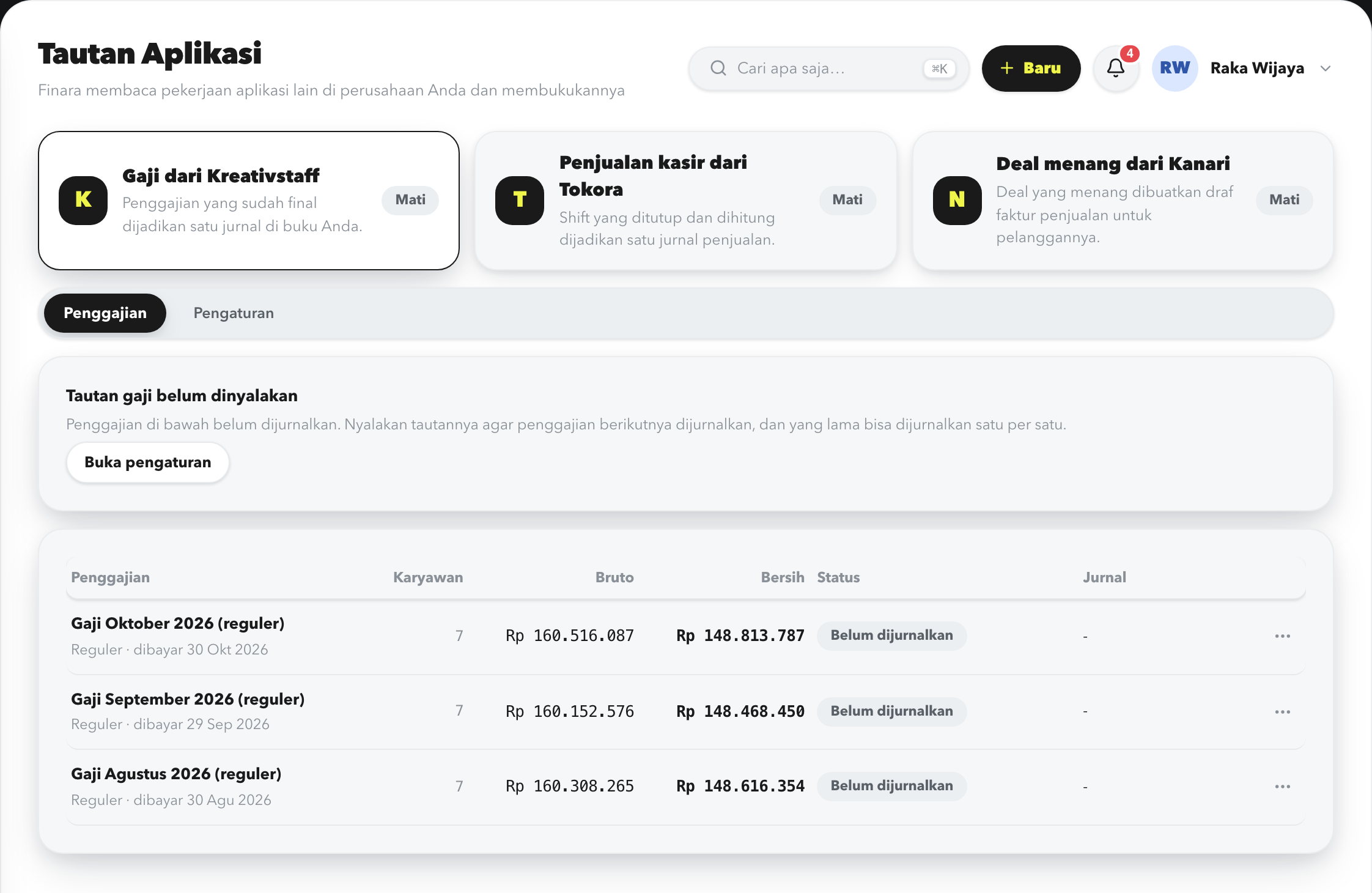
Finara reads payroll that is already final in Kreativstaff and books it as one journal per period. The journal holds: salary expense (with allowances, by cost centre) and employer expense as debits; BPJS payable, PPh 21 payable, employee receivable, other deductions payable, and salaries payable (net) as credits.
In the Pengaturan (Settings) tab, set the accounts for each role:
| Role | Required |
|---|---|
| Beban gaji (Salary expense) | Yes |
| Beban BPJS dan tunjangan perusahaan (Employer BPJS and allowance expense) | No (empty means same as salary expense) |
| Hutang BPJS (BPJS payable) | Yes |
| Hutang PPh 21 (PPh 21 payable) | Yes |
| Piutang karyawan (Employee receivable) | No |
| Hutang potongan gaji lainnya (Other payroll deductions payable) | No |
| Hutang gaji (Salaries payable) | Yes |
An account must exist, not be archived, not be a control account, and be of the type its role needs. The Isi dengan akun standar (Fill in with standard accounts) button creates the standard accounts that do not exist yet. You can also give a specific payslip component its own account (for example one allowance going to a different expense account), and switch on Beri departemen pada baris beban (Tag expense lines with a department): the department whose code matches the cost-centre code in Kreativstaff is put on the expense lines, and the result can be read in Laba Rugi per Dimensi.
The journal date defaults to the date salaries were paid.
What is not automated
Actually paying salaries (Kirim uang from the bank to Salaries Payable) and remitting PPh 21 remain in Cash & Bank and Tax. Reimbursements (claims) from Kreativstaff are not booked yet either.
Register sales from Tokora
Finara reads shifts that are closed and counted in Tokora (a shift still open cannot be booked). One shift becomes one journal:
- Debit: the account for each payment method (cash, QRIS, card, e-wallet), for its amount including tax, and Sales Discount.
- Credit: Sales Revenue (before discount) and Output VAT (the tax actually charged by the register).
- Cash difference: when the drawer holds less or more than it should, the difference is booked to Cash Over/Short, so the books hold the money the cashier counted. The opening float is not booked because it is an internal move.
The mapping in the Pengaturan tab: four Cash & Bank accounts (for cash, QRIS, card, and e-wallet sales; not a credit card, and active, so the money can be matched to the bank statement) and three accounts (Pendapatan penjualan, Sales revenue; Diskon penjualan, Sales discount; Selisih kas, Cash difference). Only the cash account and sales revenue are required; the others are asked for only when a shift needs them. A Finara branch whose code matches the outlet code in Tokora is put on the revenue and discount lines, so profit and loss per branch can be read.
The drawer difference shows on screen as Kas pas (Cash exact), Kas kurang (Cash short), or Kas lebih (Cash over).
Won deals from Kanari
A deal moved to Won in Kanari gets one draft sales invoice. Finara never issues the invoice itself: the draft waits for you to check it, complete it, then issue it in Sales.
The deal's value is read as the price before tax, and the draft takes the next invoice number (in Otomatis mode, one number for every deal that is won). The customer is matched by the company name on the deal; if that is empty, the contact's company, then the contact's own name:
- Already exists: used.
- Does not exist: created from the deal's data if Buat pelanggan bila belum ada (Create the customer if it does not exist) is on; if off, you choose the customer.
- Two customers with the same name: you choose one (email, phone, and NPWP are shown so they can be told apart).
- A deactivated customer: look for another customer.
Deal statuses: Belum dibuatkan draf (No draft yet), Menunggu dibuatkan draf (Waiting for a draft), Draf faktur dibuat (Draft invoice made), Perlu tindakan, Faktur dibatalkan (Invoice cancelled), and Diabaikan. The menu on each deal: Lihat draf yang akan dibuat (View the draft that will be made, a preview of the content, customer, tax, and total), Buat draf faktur (Create draft invoice, or Coba lagi, Buat draf lagi), Buka draf faktur (Open the draft invoice), Abaikan: sudah dibuatkan faktur dengan cara lain (Ignore: an invoice was already made another way), and Buka kembali (Reopen).
A deal that changed in Kanari after its draft was made is noted under its draft: its value or title changed, or it is no longer won. While the draft is still the one line made from the deal, Perbarui draf mengikuti deal (Update the draft to follow the deal) changes that line to the deal's value and title now. A draft you edited is never written over: adjust it yourself. An issued invoice no longer follows the deal; if needed, create a credit note or a new invoice. A deal no longer won: delete its draft if it will not be billed.
In the Pengaturan tab are the Cara kerja choice, Buat pelanggan bila belum ada, and the revenue account of the draft's lines. Nothing has to be set before switching on. Finara also states what it reads from Kanari: the title, value, company, name, email, and phone of the won deal's contact.
Sales staff see this part
A draft invoice is sales work, so sales staff can open Tautan Aplikasi and see only the Kanari deals, without payroll, register, or fleet expenses.
Fleet expenses from Armavio
Finara reads fuel logs and vehicle service records entered in Armavio and books each one as one fleet operating expense journal:
- Debit: Fleet Fuel Expense (for fuel fills) or Fleet Service & Maintenance Expense (for service and workshop records).
- Credit: the Cash & Bank account used to pay for the expense.
In the Pengaturan (Settings) tab, set Cara kerja (Tinjau dulu or Otomatis), the two expense accounts (Beban BBM and Beban servis & perawatan), and the paying Cash & Bank account. The Isi dengan akun standar (Fill in with standard accounts) button helps create standard expense accounts that do not exist yet.
The statuses match payroll and register shifts: Belum dijurnalkan, Menunggu dijurnalkan, Sudah dijurnalkan, Perlu tindakan, Jurnal dibatalkan, and Diabaikan. You can preview the journal (Lihat jurnal yang akan dibuat) before pressing Jurnalkan, and any reversal is done from its row on this screen.
When the app is not subscribed
A link is only available for apps your company subscribes to. If the source app is not active, the screen says so and what has already been booked stays visible. For payroll, the fallback is to export the payroll journal from Kreativstaff and import it in the General Journal.