

English
Working faster
Finara is designed so that what you do often takes few clicks: searching for and opening anything, creating a new document from anywhere, typing dates and amounts in short form, and seeing what is waiting for you.
Search and commands
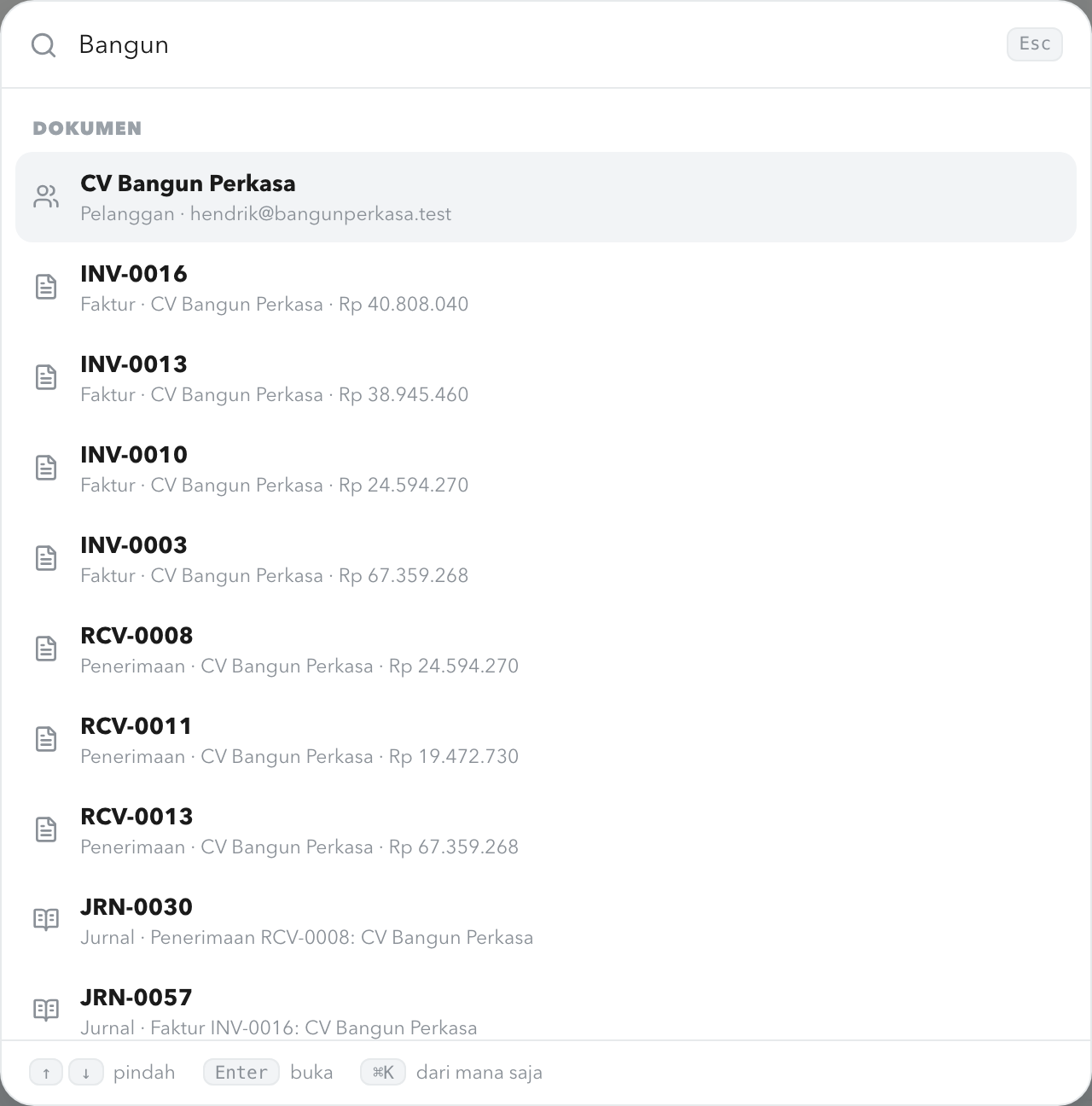
Press Ctrl+K (Cmd+K on a Mac), or / while the cursor is not typing, or click the Cari apa saja (Search anything) box at the top. Type a page name, an invoice number, a customer name, an account, or a command, then:
- Up and down arrows choose a result, Enter opens it.
- Esc closes the search.
Search covers Finara's pages, documents (invoices, quotes, receipts, credit notes, bills, supplier payments, debit notes, expenses, money received and sent, transfers, and journals), contacts, products, fixed assets, and accounts, and only what you may open.
The + Baru button
The + Baru (+ New) button at the top opens a new document from any page: sales invoice, quote, receipt, credit note, purchase bill, pay supplier bills, debit note, expense, receive money, send money, transfer between accounts, general journal, recurring journal, customer, supplier, fixed asset, budget, and product or service. What does not match your role is not shown.
The bell
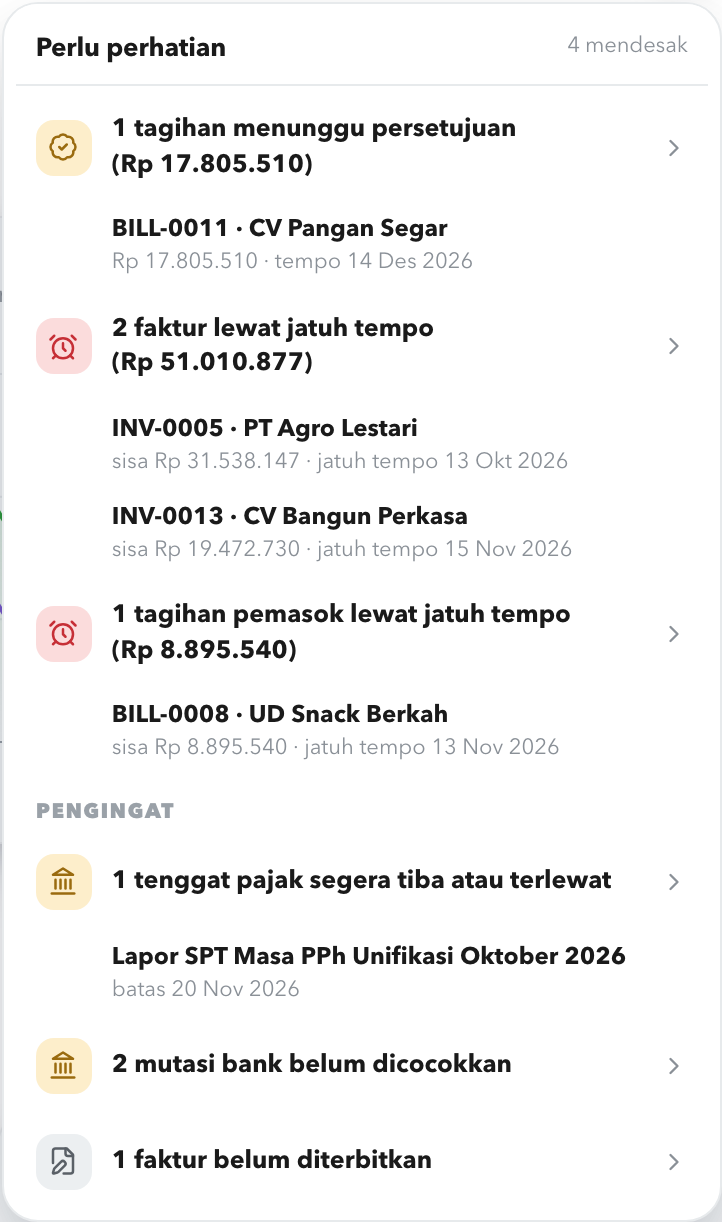
The bell at the top right shows what is waiting for you, and it is Finara that answers it, not the screen that counts for itself, so its figures match the Perlu tindakan (Needs action) list on the Dashboard.
| Kind | Meaning |
|---|---|
| Bills awaiting approval | Waiting for an approver's decision |
| Overdue invoices and bills | Past their date and not fully paid |
| Work from other apps not yet journalised | Payroll, register shifts, and deals (see Links to other apps) |
| Tax deadlines | Those with 7 days or fewer to go, or already missed (only for companies that use VAT in their books) |
| Invoices and bills falling due within 3 days | A reminder, not yet late |
| Expense accounts over budget | This year's spending up to this month passed its budget; each line names the account, the budget, and by how much, and opens that budget's Anggaran vs Realisasi report (only for those who may see budgets) |
| Bank lines, petty cash, stock, depreciation, and drafts | Routine work that can wait |
How to read it:
- The red number counts only what is urgent: something late, or someone waiting for a decision. The calmer reminders are listed beneath the label Pengingat (Reminders) and are not counted.
- Each kind names its first three documents (number, party name, balance, and due date), longest-waiting first. Click a document to open it, or click the kind's heading to open its list.
- What it holds follows your role: sales staff see only invoices, purchasing staff only bills.
- The bell refreshes itself every few minutes. When nothing is waiting, it reads Semuanya beres (Everything is in order).
Keyboard shortcuts
Press ? on any page (while the cursor is not typing) for the list of shortcuts, or choose Pintasan keyboard (Keyboard shortcuts) in the account menu. On a Mac, read Ctrl as Cmd.
| Key | Function |
|---|---|
| Ctrl+K or / | Search and open a page, document, or contact |
| ? | The shortcut list |
| Esc | Closes an open dialog, menu, or drawer |
| Ctrl+S | Saves a draft (invoice, quote, bill, notes) or saves (product, budget) |
| Ctrl+Enter | Runs a form's main button: Simpan & terbitkan (Save & issue), Posting, or Simpan (Save) |
In document lines
Lines of invoices, bills, expenses, and journals work like a spreadsheet:
| Key | Function |
|---|---|
| Tab | Move to the next column |
| Enter | Go down to the next row; on the last row, adds a new row |
| Up and down arrows | Move between rows in the same column |
| Ctrl+V | Paste cells copied from Excel or Google Sheets: each copied row becomes one document line |
Typing dates and amounts
Date and money fields understand shorthand. The result is applied when you press Enter or move to another field.
Dates:
| Type | Result |
|---|---|
h | Today |
besok | Tomorrow |
+7 | 7 days from now |
-3 | 3 days ago |
+2 mg | 2 weeks from now |
+1 bl | 1 month from now |
akhir | The end of this month |
5/11 | 5 November this year |
5 nov 2026 | 5 November 2026 |
Amounts:
| Type | Result |
|---|---|
250rb | Rp 250,000 (rb is thousand) |
1,5jt | Rp 1,500,000 (jt is million) |
2M | Rp 2,000,000,000 (M is billion) |
=1,5jt*3 | Calculated on the spot: Rp 4,500,000. It can use + - * / and brackets |
Dots and commas are read the Indonesian way: 1.500.000 is one and a half million, and so is 1,5jt. While you type shorthand, Finara shows the resulting amount beneath the field (for example = Rp 4.500.000), so a mistyped figure shows at once.
On a phone
On a narrow screen, the side menu moves into a drawer opened by the menu button, and the bottom bar holds the four most-used destinations: Beranda (Home), Penjualan, Pembelian, and Kas & Bank, plus Menu for the rest. The + Baru button and search stay at the top.
Appearance
The account menu at the top right has Mode gelap (Dark mode) or Mode terang (Light mode). The side bar can be folded with Sembunyikan (Hide) to give your screen more room. Each menu group folds too, by clicking its title: the group of the page you have open always stays open, and your choice is remembered on that device.