

English
Reports and dashboard
Every Finara report is read from the same books you see in the general ledger. Nothing is typed into a report: if a figure changes, it is because a transaction changed.
Dashboard
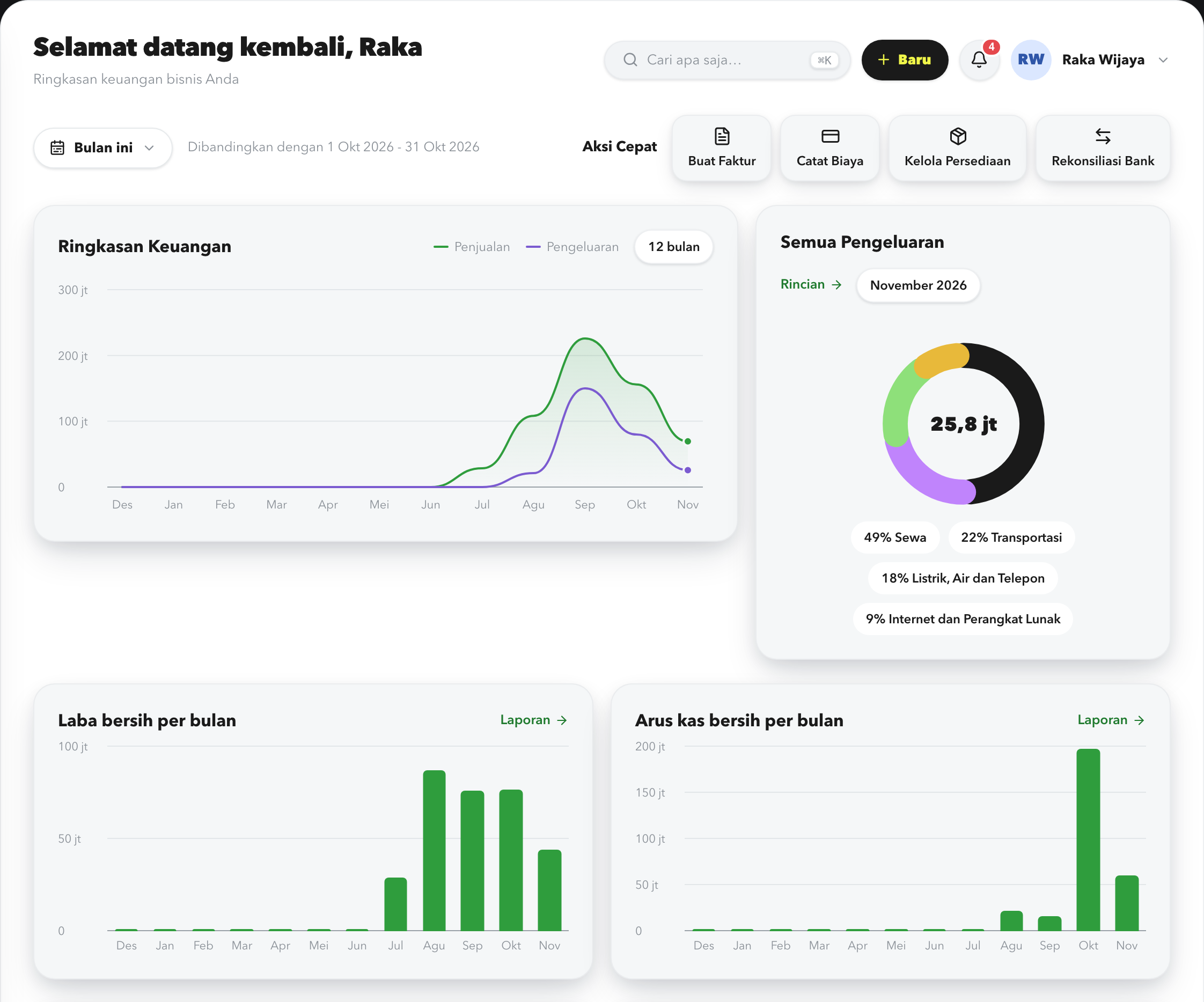
Ringkasan (Overview), Dashboard is Finara's first page. Its period is set at the top (the default is Bulan ini, This month) and its figures are compared with the period immediately before.
| Section | Shows |
|---|---|
| Total Saldo (Total balance) | The balance of all cash and bank accounts |
| Penjualan (Sales), Pengeluaran (Spending), Laba Bersih (Net profit) | The period's results, with the change from the previous period |
| Piutang Usaha (Receivables), Hutang Usaha (Payables) | What is still to be collected and paid, and how much is past due |
| Perlu tindakan (Needs action) | A list of what is waiting for you (see below) |
| Charts | Sales and spending trend, spending breakdown, profit by month, and cash flow |
| Cash per account, top customers and products, bills falling due | Summaries that click through to their screens |
Each section appears only if your role may open the screen it comes from: sales staff do not see payables, and so on. What you may not see is not shown as zero, but not shown at all.
Needs action
This list gathers what waits for someone, and each row opens its screen: bills awaiting approval, overdue invoices and bills, invoices still in draft, unmatched bank lines, journal drafts not yet posted, petty cash running low, goods below minimum stock, depreciation not yet booked, expense accounts over this year's budget, and work from other apps not yet booked.
The bell at the top right shows the same list, plus invoices and bills falling due within 3 days and tax deadlines that are close or missed. See Working faster.
The report centre
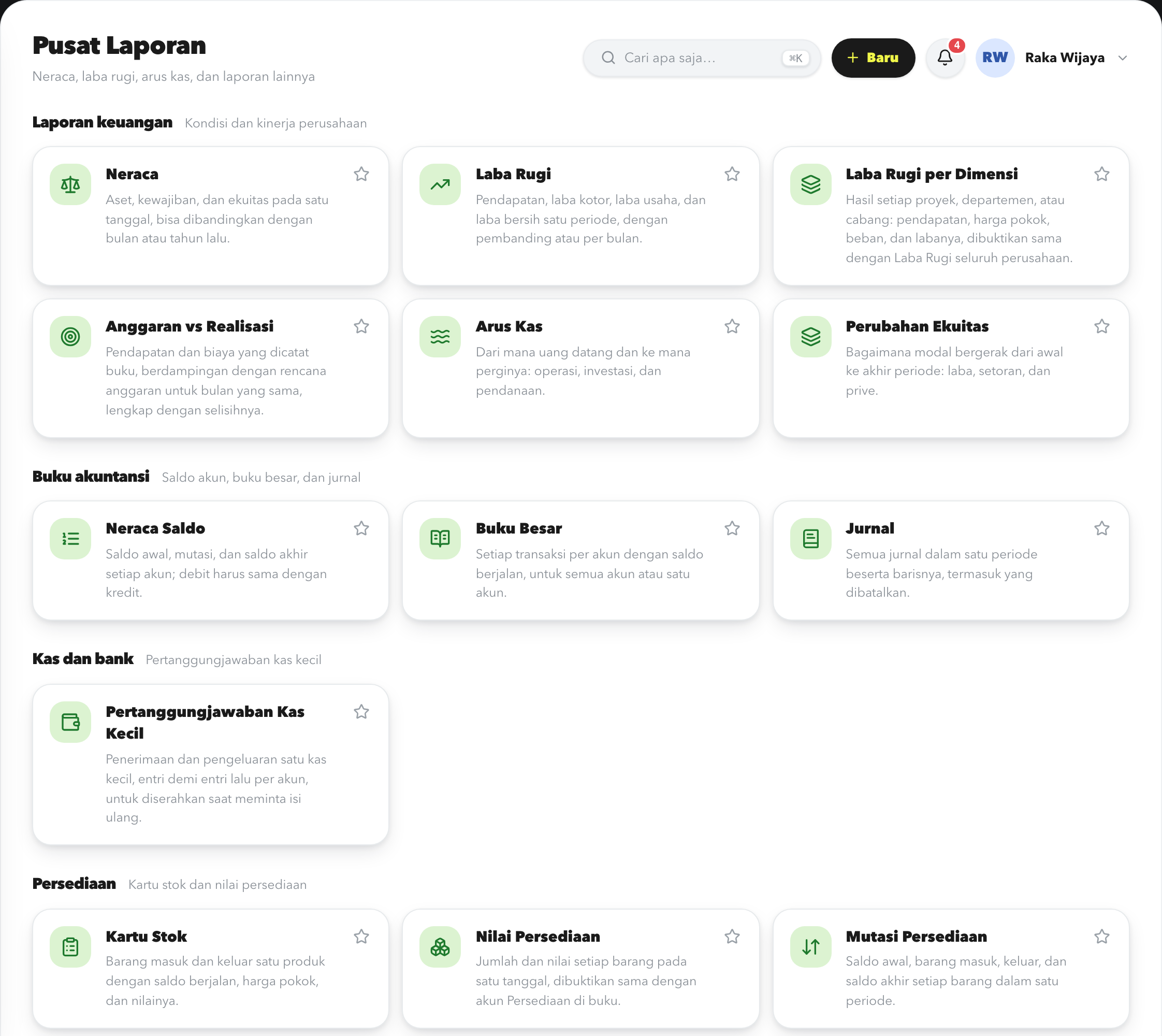
Open Laporan (Reports). Reports are grouped by need, and only the reports you may open are shown:
| Group | Reports |
|---|---|
| Laporan keuangan (Financial statements) | Neraca (Balance Sheet), Laba Rugi (Profit and Loss), Laba Rugi per Dimensi (Profit and Loss by Dimension), Anggaran vs Realisasi (Budget vs Actual), Arus Kas (Cash Flow), Perubahan Ekuitas (Changes in Equity) |
| Buku akuntansi (Accounting books) | Neraca Saldo (Trial Balance), Buku Besar (General Ledger), Jurnal (Journal) |
| Piutang dan hutang (Receivables and payables) | Umur Piutang (Receivables Aging), Umur Hutang (Payables Aging) |
| Analisis (Analysis) | Penjualan per Pelanggan (Sales by Customer), Penjualan per Produk (Sales by Product), Pembelian per Pemasok (Purchases by Supplier), Rincian Beban (Expense Breakdown) |
| Pajak (Tax) | Rekap PPN Masa (VAT Period Summary), Daftar Faktur Pajak Masukan (Input Tax Invoice List), Rekap PPh Masa (Income Tax Period Summary) |
| Kas dan bank (Cash and bank) | Pertanggungjawaban Kas Kecil (Petty Cash Accountability) |
| Persediaan (Inventory) | Kartu Stok (Stock Card), Nilai Persediaan (Inventory Valuation), Mutasi Persediaan (Inventory Movement) |
| Aset tetap (Fixed assets) | Daftar Aset Tetap (Fixed Asset Register), Penyusutan Aset Tetap (Fixed Asset Depreciation), Jadwal Penyusutan (Depreciation Schedule) |
The General Ledger and the Journal hold every line ever posted, so they need the accounting permission, not just the reports permission.
Setting up a report
Above each report:
- Period. Choose Bulan ini (This month), Bulan lalu (Last month), Kuartal ini (This quarter), Kuartal lalu (Last quarter), Tahun berjalan (Year to date), Tahun lalu (Last year), 30 hari terakhir (Last 30 days), Semua tanggal (All dates), or your own dates. Without a period, a report uses the current fiscal year. Position reports (such as the Balance Sheet and Receivables Aging) use Per tanggal (As of).
- Bandingkan dengan (Compare with). Periode sebelumnya (Previous period), Tahun lalu (Last year), or Per bulan (By month: one column per month, plus a total). The Balance Sheet compares with Bulan lalu, Tahun lalu, Akhir tahun buku lalu (End of last fiscal year), or Pilih tanggal (Pick a date). The previous period is worked out by month, not 30 days: November is compared with October.
- Filters. Depending on the report: project, department, or branch; product and warehouse; one account; one budget; one petty cash account.
- % dari pendapatan (% of revenue, Profit and Loss) and Rinci per dokumen (Detail per document, Receivables and Payables Aging) change what the table shows.
Tracing a figure
Click a figure to open its source: that account's ledger, then the journal and document behind it (invoice, bill, customer, or supplier). If the report is narrowed (for example to one project), the ledger that opens is narrowed the same way.
Export and print
The Ekspor (Export) menu downloads the report as Excel (.xlsx) or PDF, and Cetak (Print) prints it. The downloaded file holds exactly the figures on screen, with the company letterhead. A very long report is cut short on screen with a note; narrow the period or download the file, which holds more rows.
Reports that prove themselves
Some reports check themselves and show the result:
| Report | What is checked |
|---|---|
| Neraca (Balance Sheet) | Assets equal liabilities plus equity |
| Neraca Saldo (Trial Balance) | Total debits equal total credits |
| Arus Kas (Cash Flow) | The increase in cash equals the change in the Cash & Bank balance |
If a check fails, the report shows it plainly: it means the books hold something that cannot be explained, and an accountant should look at it before the figures are used.
Three reports used often
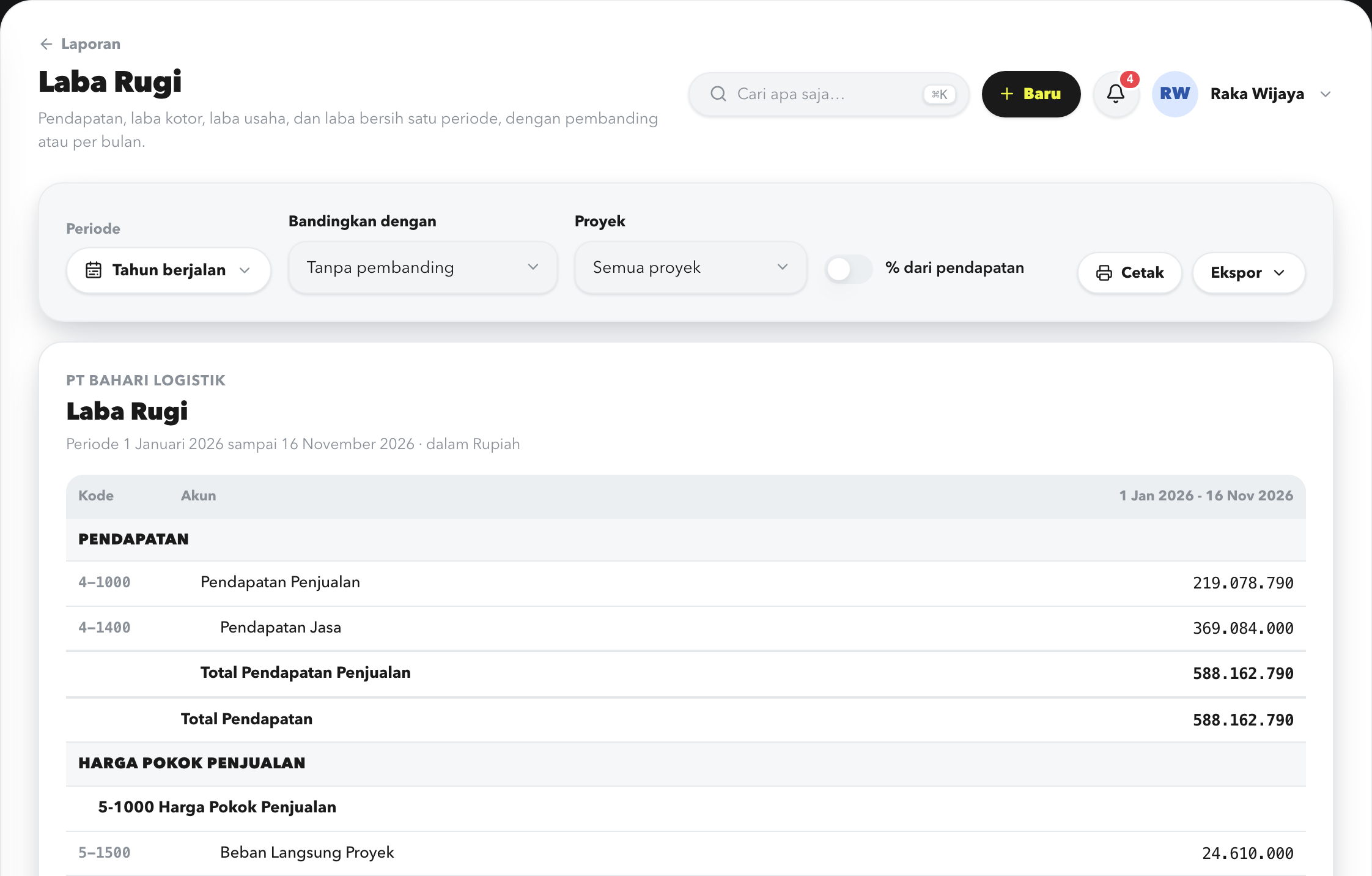
Profit and Loss adds up the period's revenue and expenses. The closing journal is not counted, so the profit and loss of a closed year stays readable.
Cash Flow uses the indirect method: it starts from net profit, adds back non-cash expenses such as depreciation, then adjusts for changes in working capital, investing, and financing. Opening balances entered through Opening Balances are not cash flow. Each account's group (operating, investing, financing, or cash) is set in the Chart of Accounts.
Receivables Aging and Payables Aging sort what is unpaid by how late it is: not yet due, 1 to 30 days, 31 to 60, 61 to 90, and more than 90 days. Receivables Aging starts with the customer who owes most, where a collector usually begins.