

English
Inventory, assets, budgets, and projects
This page covers the Persediaan (Inventory), Aset & Anggaran (Assets & Budget), and Proyek & Dimensi (Projects & Dimensions) menu groups. Everything here is optional: use what fits your business.
Inventory
Inventory is off until you switch it on. While it is off, invoices and bills for goods are recorded as usual without moving stock. Once on, stock moves by itself together with its documents.
Starting
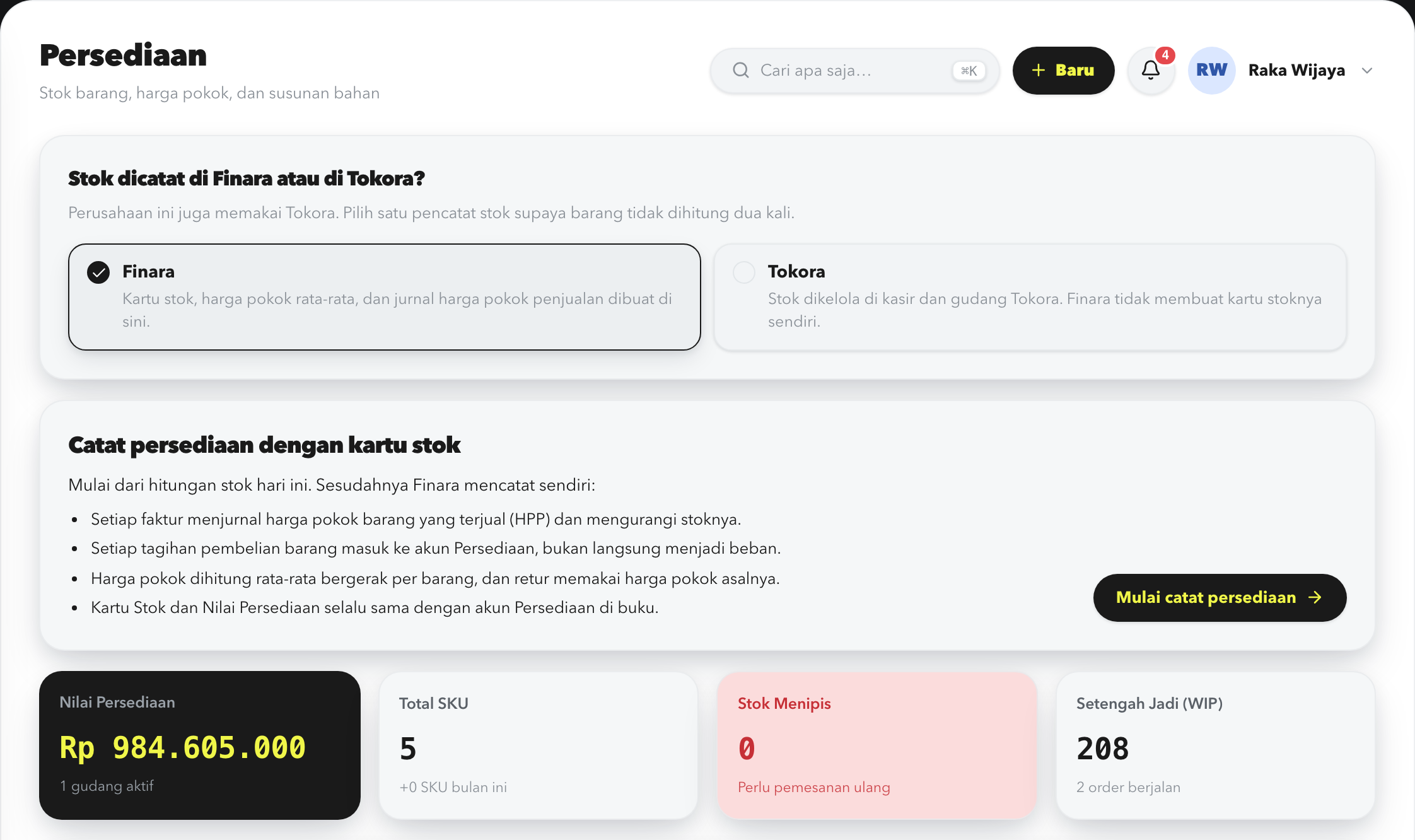
Open Persediaan (Inventory) and choose Mulai catat persediaan (Start recording inventory). There are three steps:
- Mulai kapan, dan di mana (When to start, and where). Fill in the Tanggal mulai (Start date) and the Nama gudang (Warehouse name, the first warehouse). Izinkan stok minus (Allow negative stock) decides what happens when an invoice sells more than the stock: when off, the invoice is refused until the purchase is recorded; when on, the invoice still issues and the shortfall is valued at the last cost. It can be changed any time.
- Stok awal (Opening stock). Fill in the Jumlah (Quantity) and Harga pokok per satuan (Unit cost) of each item from your physical count; items with quantity 0 start empty.
- Jurnal saldo awal (Opening balance journal). Choose how the opening stock value is booked.
Starting is done once. Only documents dated from the start day and posted afterwards move stock; older documents are not re-journalled.
How stock moves
| Document | Stock | Its journal |
|---|---|---|
| Invoice for goods | Out at the average cost | Cost of goods sold goes up, inventory goes down |
| Bill for goods | In at its purchase price | Inventory goes up |
| Credit note | Goods come back at the cost they were sold at on the original invoice (not when Hanya potongan harga, Price discount only) | Reverses the cost |
| Debit note | Out again to the supplier | Inventory goes down, the price difference goes to Inventory Variance |
| Penyesuaian (Adjustment), Stok opname (Stock count) | Up or down per the correction | The difference is booked |
| Cancelling a document | Its stock movement is reversed | Its journal is reversed |
Cost uses the moving average per item across all warehouses. Values already posted are not recalculated, so the inventory value in the books always equals the stock card.
The Inventory menu
Once stock is kept with stock cards, the Persediaan (Inventory) menu group has these pages (before that only Stok, which shows how to start):
| Page | Purpose |
|---|---|
| Stok (Stock) | Quantity and value per item, per warehouse |
| Penyesuaian Stok (Stock adjustments) | Manual stock corrections |
| Transfer Gudang (Warehouse transfers) | Moving goods between warehouses. The value does not change and there is no journal; the source warehouse must have enough, so a transfer never makes a warehouse negative |
| Stok Opname (Stock count) | A physical count sheet per warehouse and date: the system quantity is compared with the count, and the difference is booked as an adjustment |
| Gudang (Warehouses) | The warehouse list. The default warehouse and one still holding goods cannot be deactivated |
| Barang & Susunan Bahan (Goods & bills of materials) | The tracked items and their bills of materials (for manufacturing) |
Goods documents show a Gudang (Warehouse) field when the company has more than one active warehouse. The Kartu Stok, Nilai Persediaan, and Mutasi Persediaan reports are in Reports.
If the company also uses Tokora
Stock must not be counted twice. In Persediaan, choose one stock keeper: Finara or Tokora. While Tokora keeps the stock, Finara does not make stock cards, cost of goods, or cost-of-goods journals of its own; invoices and bills are still recorded as usual. The choice can be reversed.
Manufacturing
For businesses that assemble or produce, Manufaktur (Manufacturing) records production orders: the product made, the quantity, the materials used, and the cost.
Each product's bill of materials is set in Persediaan, Barang & susunan bahan. The order list shows No. perintah (Order no.), Produk, Jumlah, Progres, Biaya (Cost), and Status: Berjalan (Running), Dalam proses (In progress), Selesai (Done), or Dibatalkan (Cancelled). An order's page holds the Susunan bahan (Bill of materials: requirement, issued, remaining, and in the warehouse), Biaya produksi (Production cost), and Riwayat (History).
While inventory is being recorded, orders use Work in Progress:
- Materials issued leave the warehouse at the average cost and go into the Work in Progress Inventory account. Biaya lain (Other costs) are recorded against the account where that cost is booked (a cash or bank account is recorded through Send money first).
- When the order is done, the finished goods enter stock at everything in Work in Progress. The production cost is worked out from the recorded materials and costs, not typed.
- An order that is still open can be cancelled: the materials return to the warehouse and every journal is reversed.
Fixed assets
Open Aset Tetap (Fixed Assets). The asset list shows Nomor (Number), Aset, Perolehan (Acquired), Nilai perolehan (Cost), Akumulasi (Accumulated depreciation), Nilai buku (Book value), and Status (Aktif, Dilepas Disposed, or Dibatalkan). Registering an asset does not create new value: its cost is already in the books (or made at the same time through Kirim uang), and registration adds how to depreciate it.
Registering an asset
From + Baru, Aset tetap baru (New fixed asset), or from a bill line booked to a fixed-asset account (the Daftarkan sebagai aset button on the bill's page). Choose where the cost comes from:
| Source | Meaning |
|---|---|
| Dari tagihan (From a bill) | A purchase bill line already approved and booked to a fixed-asset account |
| Dibayar dari rekening (Paid from an account) | Finara makes a Kirim uang from that account to the fixed-asset account, together with the registration |
| Sudah dibukukan (Already booked) | The cost is already in the books: opening balance, Send money, or a journal |
Main fields: Nama aset (Asset name), Kategori (Category, which fills in the usual life and method, which you can still change), Tanggal perolehan (Acquisition date), Nilai perolehan, Akun aset (Asset account), Metode (Method), Umur ekonomis (bulan) (Useful life, months), Nilai sisa (Salvage value), and Mulai disusutkan (Start of depreciation). The method is straight-line or declining balance (with a Tarif per tahun, Annual rate); land is not depreciated. An old asset already depreciated in a previous system is marked Sudah disusutkan sebelumnya (Already depreciated before).
Cost, date, and account lock once the source document holds them or depreciation has been posted. A source bill cannot be cancelled while a live asset exists from it.
Monthly depreciation
Open Aset & Anggaran (Assets & Budget), Penyusutan (Depreciation). This page shows depreciation by month. One month becomes one journal (depreciation expense against accumulated depreciation), with one row per asset. Months are booked in order and only those already ended; a month in a locked period waits.
- Bukukan penyusutan (Book depreciation) shows that month's plan first, then books it.
- The Otomatis (Automatic) switch (off by default) books depreciation itself after the month ends. When off, the Dashboard reminds you through Perlu tindakan that a month has not been booked.
- A booked month can only be cancelled if it is the last month for each of its assets.
The depreciation schedule is always worked out from the asset's terms and what has been posted: there is no schedule table that could fall out of step.
Disposing of an asset
On the asset's page, Jual atau hapus (Sell or write off) opens Lepas (Dispose) with the asset number: Finara books depreciation up to the month of disposal, then one journal that removes the asset and its accumulated depreciation, records the sale proceeds, and works out the gain or loss on disposal. Disposal is refused if depreciation before that date has not been booked.
The Daftar Aset Tetap, Penyusutan Aset Tetap, and Jadwal Penyusutan reports are in Reports.
Budgets
Open Anggaran (Budgets) then Anggaran baru (New budget).
- Nama (Name), Tahun buku (Fiscal year), and Untuk (For): the whole company, or one project, department, or branch. A budget for one project is compared with the transactions marked with that project.
- Mulai dari (Start from): Kosong, saya isi sendiri (Empty, I will fill it in), Dari realisasi tahun buku sebelumnya (From last fiscal year's actuals), or Salin dari anggaran lain (Copy from another budget). The last two can be raised or lowered with Naikkan atau turunkan (%) (Raise or lower, %).
On the budget's page you fill in one figure per revenue or expense account per month. The year and scope cannot be changed once the budget is made. The budget menu has Ubah nama dan catatan (Edit name and note), Arsipkan (Archive, and Buka kembali), and Hapus anggaran (Delete budget).
Two people saving from the same copy do not silently overwrite each other: the second is offered Muat angka terbaru (Load the latest figures) or Timpa dengan angka saya (Overwrite with mine). An account that has figures in a budget cannot be deleted.
The Anggaran vs Realisasi report (in Reports) compares the budget you choose with the books, month by month.
Finara also watches this year's budgets: an expense account whose spending up to this month passed its budget appears under Perlu tindakan (Needs action) on the Dashboard and in the bell, with the budget's name and the excess. Only accounts that have figures in that budget are watched; a parent account counts together with the accounts under it, the same as its subtotal in the report. Archived budgets are not watched.
Projects, departments, and branches
The Proyek & Dimensi (Projects & Dimensions) menu group has three pages: Proyek (Projects), Departemen (Departments), and Cabang (Branches). They are tags for seeing profit and loss by part of the business.
- On invoice, bill, expense, and journal lines, choose the project, department, or branch. The columns are shown through the Kolom menu in the line editor.
- The tag carries to journal lines for revenue, cost of goods, expense, inventory, and assets; receivable, payable, cash, and tax lines do not carry it.
- A project has an RAB (Rp) (budget), Biaya di luar buku (Rp) (Costs outside the books), and instalments. A project's actual cost is the cost the books record on lines tagged with it, plus the outside costs you type.
- When the project has budgets (budgets whose scope is that project), its RAB is the cost those budgets plan, over all their years, and its card reads dari anggaran (from the budget) under the RAB. The RAB you typed is used again once no budget plans a cost.
- One that is closed (its in-use switch turned off) accepts no new documents but stays attached to documents that already carry it. Only one that has not been used can be deleted.
The Laba Rugi per Dimensi report adds up the result of each project, department, or branch, with a Tanpa proyek (No project) row for what is not tagged yet; its rows add up to the whole company's profit and loss. Profit and Loss, Expense Breakdown, and General Ledger can also be narrowed to one dimension.