

English
Clock in and clock out
The daily routine at Attendance → My Attendance. This page also covers what to do when you forget.
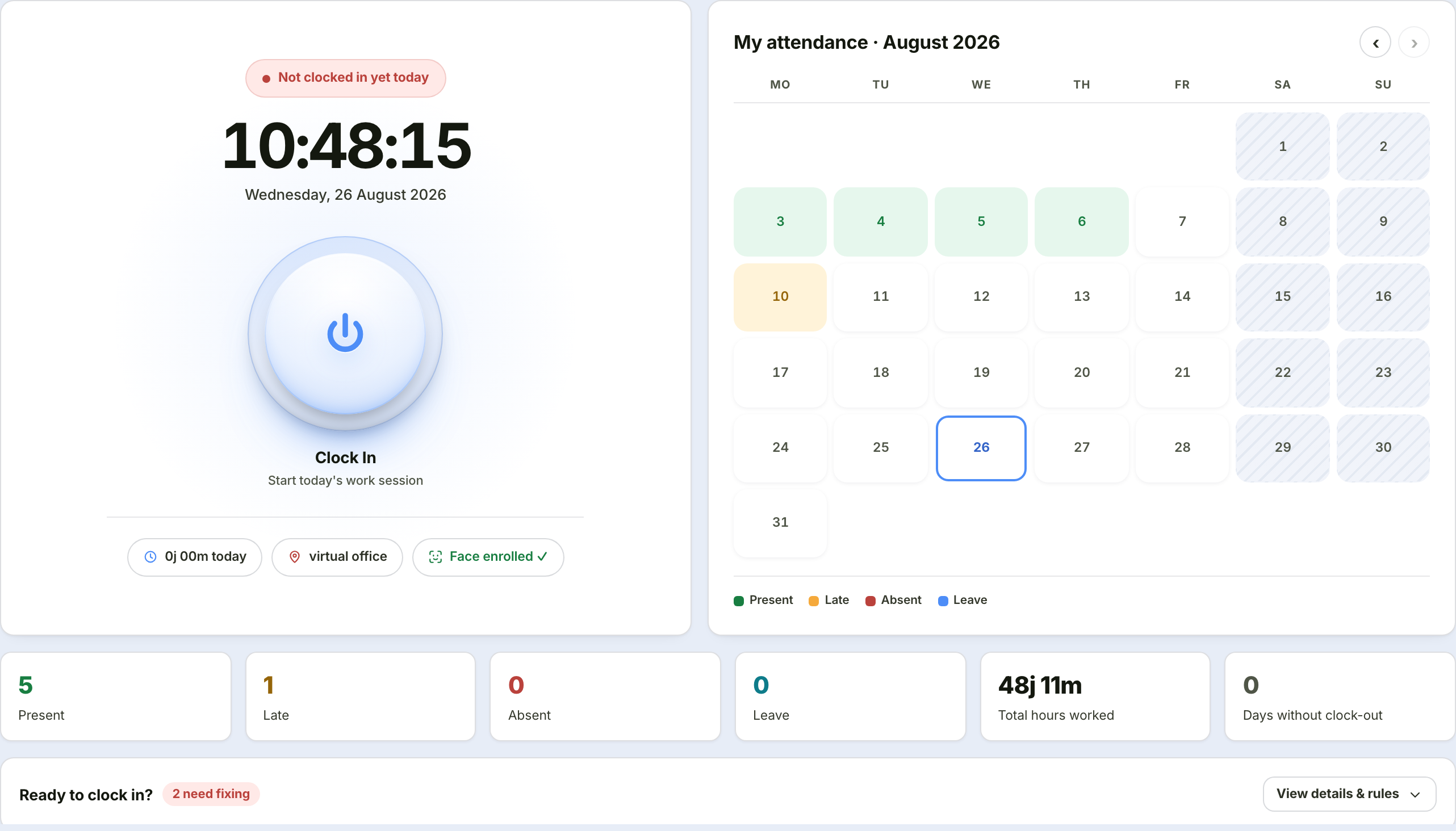
One working day
Morning: clocking in
Open Attendance → My Attendance.
Look at the "Ready to clock in?" card. There are five checks:
Check What a failure means Today's schedule A holiday, you are on leave, not a working day, or attendance is not open yet Location No location signal yet, or you are outside the radius of every office assigned to you Location accuracy The signal is too coarse — usually because you are deep inside a building Face verification Your face is not enrolled although it is required Work mode WFH is selected but no approved WFH request exists Every failing row carries a fix button on its right. Press it — the system takes you where you need to go.
Press the large power button. A three-step wizard opens:
Step What it holds 1. Mode & location Choose Office or WFH; a map shows your distance to the nearest of your assigned offices 2. Verification Take a face photo — required or optional depending on company rules 3. Confirm A summary, plus a lateness reason if you are late
If you are late, the reason is mandatory
Step 3 will ask for a reason and cannot be skipped. Minimum three characters.
Your manager reads it when reviewing monthly attendance. Writing "stuck in city centre traffic" is far more useful than leaving it blank and being asked a month later when you have forgotten.
Evening: clocking out
Press the same button — now reading Clock Out.
Leaving before your shift ends needs a reason
The system refuses an early clock-out without one. The reason you give enters your manager's queue as an Early Departure request, to be approved or rejected like any other.
If you forget to clock in or out
Do not leave it. A day without a clock-out has no working hours counted, and that feeds straight into the figures payroll reads.
Two ways to fix it:
On the month summary card, the "Days without clock-out" figure shows how many are affected. Press Request correction →.
Or open the history, click the row for the wrong day, then press "Something wrong? Request an attendance correction" at the bottom of the detail.
More about attendance corrections →
What the My Attendance page holds
| Part | What it holds |
|---|---|
| Clock card | A running clock, today's status, the clock in/out button, hours worked today, your nearest assigned office, face enrolment status |
| Month calendar | A colour per day: green present, amber late, red absent, blue leave |
| Month summary | Present · Late · Absent · Leave · Total hours · Days without clock-out |
| Ready to clock in? | The five checks — only shown before clocking in |
| Your attendance rules | Shift, clock-in window, lateness threshold, the radius of each assigned office, face requirement, early-departure tolerance, automatic clock-out |
| Map | Your position against the radius of your nearest assigned office; can be collapsed |
| History | A table for the current month — click a row for full detail |
One day's detail
Clicking a history row opens all the evidence for that day:
- The clock-in photo and its location on a map
- Distance from the nearest assigned office, and the location signal's accuracy
- Work mode, and its source (phone app or web)
- The name of the attendance rule in force that day
- The lateness note you wrote
- Early departure status with your manager's note
- A marker if the clock-out was performed automatically by the system
- The result of the face authenticity check
Why employees can see all of this
This is the evidence that settles an attendance dispute. Previously only managers could see it — for data concerning your own entitlements, that is backwards.
Common problems
| What you experience | Cause | What to do |
|---|---|---|
| The clock-in button is dead | Outside attendance hours, or no office/shift assigned | Check the opening time; contact HR if the assignment is missing |
| "Outside the office area" while at the office | The location signal is imprecise, or you are at a company office that has not been assigned to you | Step outside briefly, wait for a stable signal; if you genuinely work from that office, ask HR to add it as one of your additional offices |
| Location accuracy keeps being refused | You are deep inside a building | Try near a window, or use the phone app |
| Face not recognised | Poor lighting, or a change in appearance | Re-enrol your face somewhere well lit |
| Forgot to clock out yesterday | — | Request an attendance correction |