

English
Approval Center
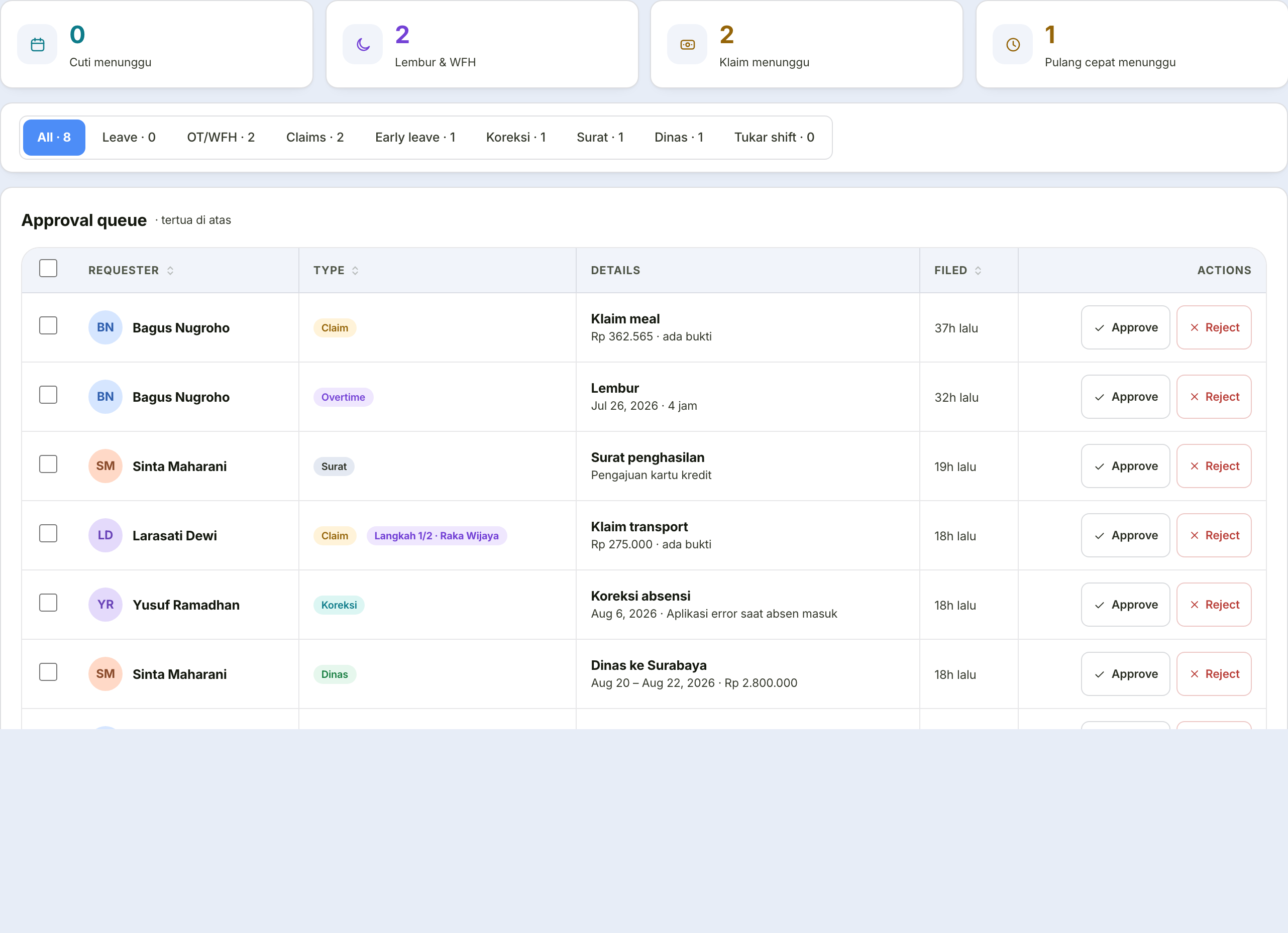
One queue for every request type, longest-waiting first. This is the only place decisions are made.
Manager-assigned overtime never passes through this queue
Besides being filed by employees, overtime can also be assigned directly by a manager — and an assignment is already authorised the moment it is created, so it never waits here for a second decision. All that is left for the employee it was assigned to is one confirmation step on their own Overtime & WFH page.
"Overtime reconciliation" is a different queue, with different actions
The moment an employee clocks out, the actual overtime hours are compared against what was approved. If the actual is longer, the row shows up under the Overtime reconciliation filter — not Approve/Reject, but Extend (pay the actual hours) or Cap (keep paying the approved figure). An actual that is shorter never lands here at all — it is adjusted automatically, with no decision from anyone needed.
The tabs
Four or five tabs, depending on your permissions:
| Tab | What it holds |
|---|---|
| Queue | Everything awaiting your decision |
| Decision history | What you decided, when, and with what note |
| My delegations | Naming a substitute while you are away |
| Request rules | What may be asked for — settings holders only |
| Chains & delegation | Who decides — settings holders only |
Two ways to decide
Quick — approve and reject buttons directly on the row, for the obvious ones. You can also tick several rows and decide them together.
Careful — click the row to open the full detail.
What the detail holds
| Tab | What it holds |
|---|---|
| Details | Facts specific to that type |
| Evidence | Attachments with live preview — images and PDFs open in place |
| Discussion | Conversation with the requester |
| Trail | Who has decided, who is next, who was skipped and why |
The facts prepared per type
The Details tab does not merely repeat the form. It prepares the facts you need to decide:
| Type | What is shown |
|---|---|
| Leave | The balance remaining after approval, and who else is on leave in the same range |
| Overtime | The day's classification, how many paid hours it becomes, any limit breaches, and that day's attendance — did they really work late. Once clocked out, the actual-hours reconciliation shows here too |
| Working from home | The range and number of days |
| Claims | Amount, expenditure date, and the receipt shown in place |
| Attendance correction | "Currently recorded" against "requested", plus the difference in minutes, with a warning when the gap is large |
| Letters | Type, purpose, recipient; a specific warning for income letters |
| Business trips | Duration, cost per day, and the advance as a proportion of the estimate |
| Shift swap | Both employees, both dates, each one's shift, and when the colleague agreed |
| Early departure | Clock-in and clock-out times, the reason, and the attendance photo |
Why leave shows "who else is on leave"
Approving one person's leave is rarely wrong because of their balance; it is wrong because three people on the same team are off in the same week. That fact is put in front of you so the decision does not have to be guessed at.
Three actions, not two
| Button | Effect |
|---|---|
| Approve | Note optional; the requester is notified |
| Reject | Reason mandatory — the requester reads it |
| Ask the requester | Sends a question through Discussion; the request stays pending |
Your electronic signature is captured when you approve
If you have set up an electronic signature on your Profile page, it is automatically stamped every time you press Approve — visible on that request's Trail tab. Not having set one up does not stop you from approving anything; the decision simply carries no signature image with it.
"Ask the requester" is an important middle path
Without this button, an approver has only two bad options: approve something they do not understand, or reject someone for failing to mention information nobody asked for.
Rejection reasons are mandatory for the same reason — "Rejected" alone helps nobody, and the requester will resubmit with the same mistake.
Clearing the queue quickly
Inside the detail, without closing it:
| Key | Effect |
|---|---|
| ‹ › or K / J | Move to the previous or next request |
| A | Approve |
| R | Prepare a rejection — the cursor goes straight to the reason field |
| Esc | Close |
After deciding, the detail moves automatically to the next request.
Approval Analytics
A separate page for looking at the process, not the substance of decisions.
| Shown | Answers |
|---|---|
| Cycle time | How long a request takes to decide on average |
| Timeliness | How many pass their deadline |
| Escalation | How often a step stalls until it needs a reminder |
| Approver load | Who decides the most, and who is the bottleneck |
This page deliberately does not show rejection reasons
It was built to improve workflow, not to audit the substance of individual people's decisions.