

English
Setting up a KPI programme
The Programmes & Templates page, for KPI admins. Work through in order.
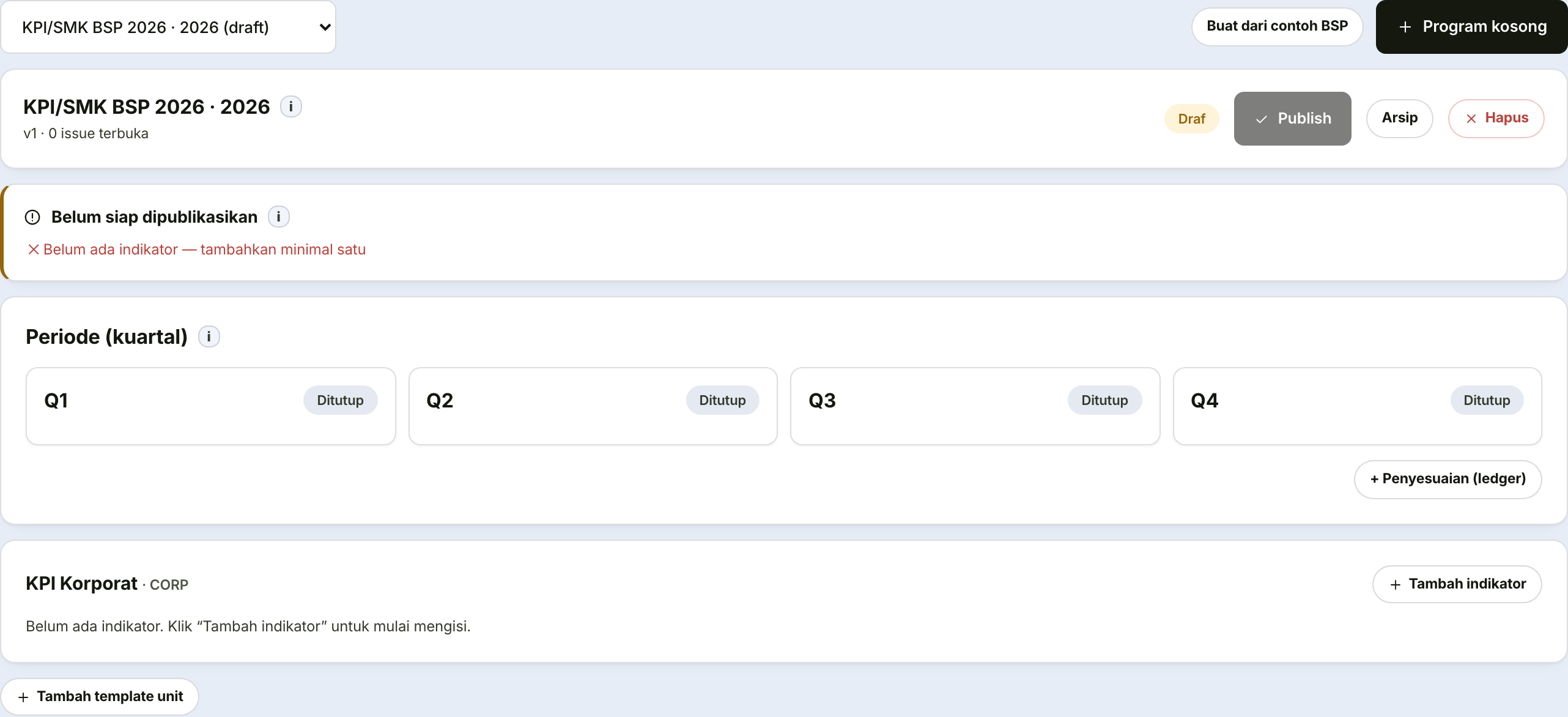
1. Create the programme
One programme represents one assessment year. It contains four quarterly periods.
2. Create unit templates
A template is one set of indicators for one kind of unit.
| Field | What it holds |
|---|---|
| Unit code | The unit's abbreviation |
| Template name | A recognisable name, for instance "Branch Template" |
Once a template exists, its panel shows a Department picker (changeable while the programme is still Draft). Linking a department to this template is what makes Enrol participants (step 4) pick this template for employees in that department. Without a link, the template still gets created but is never actually used — those employees keep receiving the default corporate template.
3. Add indicators
For each template, add its indicators one at a time:
| Field | What it holds | Note |
|---|---|---|
| Indicator name | What is being measured | Write it as an outcome, not an activity |
| Dimension | Its assessment perspective | Decides its grouping on the dashboard |
| Unit | Percentage, currency, count, days | Decides how the result is displayed |
| Weight | This indicator's contribution | You enter a percentage |
| Formula | How the result becomes a score | Shown in the in-app guidance |
| Target | The figure to reach |
Write indicators as outcomes, not activities
"Run 12 training sessions" is an activity — it is satisfied even if nobody learned anything.
"85% certification pass rate" is an outcome. That is what deserves measuring.
Complementary sub-indicators
Some measures — reporting indicators most often — are really one main measure plus a smaller companion. Press Complement on an indicator's row (while the programme is still a draft) and give it a name.
The two then share one weight. The complement takes 15% of its parent's weight and the parent keeps the rest, so an indicator weighted 20% becomes 17% and 3%. The template's total does not move, which means adding a complement can never break the requirement that a template add up to 100%. You can change that 15% to anything between 1% and 50%.
A complement's weight is set from its parent
Opening a complementary sub-indicator shows only its name and targets — its weight cannot be typed there. Change it from the parent indicator instead: the weight field there means the pair's combined weight, with a separate field for the complement's share.
Deleting a complement returns its weight to the parent; deleting a parent takes its complement with it. Either way the template stays whole.
4. Publish and enrol participants
Publishing locks the template so it can be used. Enrolling participants creates a scorecard for each person — that is what moves scorecards to the Draft stage. Each person receives the template matching their department (step 2): if their department is linked to a unit template, they get that template's indicators; otherwise they get the default corporate template.
Publish only after every indicator and weight is correct
Changing indicators after employees have begun entering results makes their data incomparable with one another — and there is no way to tidy it other than repeating the quarter.
5. Annual adjustments
A record for additional or deducted points outside the indicator calculation.
| Field | What it holds |
|---|---|
| Employee | Who is being adjusted |
| Type | The adjustment category |
| Points | The size of the adjustment; leave blank to use the type's default |
| Reason | Always fill this in |
The adjustment reason will be read when a result is challenged
Adjustments are the only place a figure moves outside the formula. If the reason is blank, nobody can explain it months later.
Points for lateness and unauthorised absence don't need to be logged one by one — the Sync from Attendance button computes them automatically from employees' attendance records across the programme year. Safe to press repeatedly: a changed count updates its entry, and an entry whose event no longer applies (say, after an attendance correction) is removed automatically. Other adjustment types — warnings, dual assignments, ad-hoc duties — are still logged manually as before.
Settings: weights and grade thresholds
A separate page, changeable by KPI admins and Human Capital.
| Field | Rule |
|---|---|
| Form 1 and Form 2 weights | Must total exactly 100 |
| Grade thresholds | Must descend from highest grade to lowest |
| Default adjustment points | Used when the points field is left blank |
The system refuses to save weights that do not total 100, or thresholds that do not descend.
Do not change weights or thresholds mid-quarter
The change shifts everyone's grade at once, including scorecards already past their review stage.
Do it before the quarter goes active, or after it closes.