

English
Overtime and working from home
Both live on one page: My Requests → Overtime & WFH.
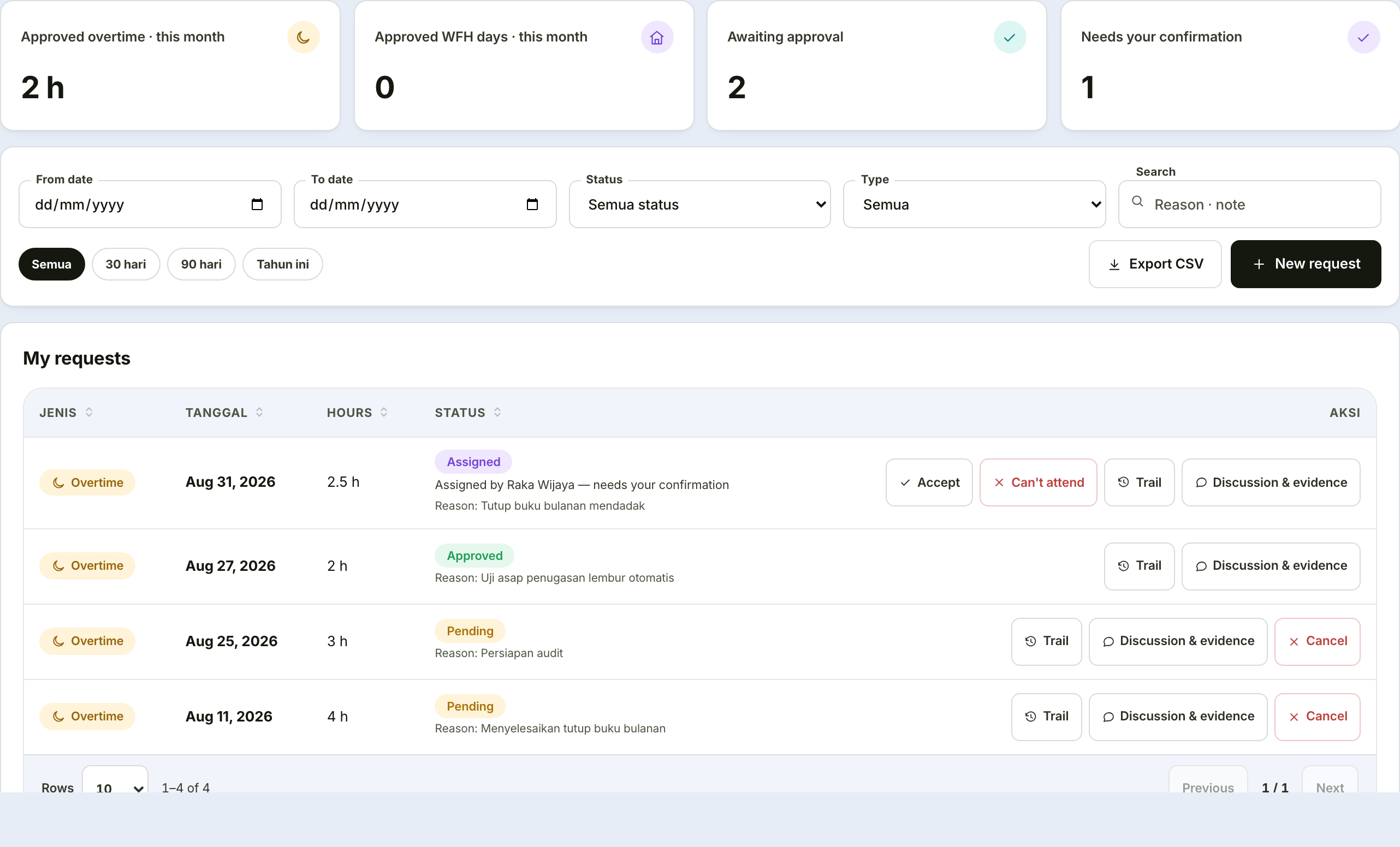
Overtime
Step by step
Open My Requests → Overtime & WFH, click New request, then choose Overtime.
Pick the date of the overtime — one day per request. Overtime that runs past midnight is still one request, not two.
Set the start and end times. The duration fills itself in; the duration box deliberately cannot be typed into.
Read the pay preview that appears under the time control before going on. It shows how many wage-hours will be counted and the context of the day — a public holiday is counted differently from an ordinary working day.
Pick a reason from the list, then fill in the additional note (at least three characters). If your reason is not on the list, choose Other and write it yourself.
Attach evidence if it is asked for, then click Send. If your request goes past a daily or weekly limit, the warning has already appeared before this point and the submit button is locked.
The form
| Field | Required | Note |
|---|---|---|
| Date | ✔ | One day per request |
| Start time | ✔ | Refused if earlier than company policy allows |
| End time | ✔ | May cross midnight — 22:00 to 02:00 counts as 4 hours |
| Duration | automatic | Derived from the times; cannot be typed |
| Reason | ✔ | Pick from the list, or "Other" |
| Additional note | ✔ | At least three characters |
| Evidence | depends on rules | For example a screenshot of the ticket |
Why duration cannot be typed
Two sources for the same number is how a request ends up claiming "3 hours" for a 19:00–23:00 window. Duration is always derived from the times, never the reverse.
A pay preview appears before you submit
Below the time picker, the system shows an estimate of how the overtime hours convert into paid hours, along with the day's context — a public holiday, for instance, is counted differently from an ordinary working day.
If your request exceeds a daily or weekly limit, the warning appears before submission and the submit button locks. This saves a round trip: the limit is no longer discovered only as a rejection after submitting.
Two different overtime rules
Two things both concern overtime, set by different people:
| Rule | What it holds | Set by |
|---|---|---|
| Request rules | Time increments, per-request limits, monthly quota | The HR settings holder |
| Payment rules | Rounding, daily and weekly limits, how the pay is calculated | The payroll holder |
Both appear side by side, but only the entitled person can change each. The payment figures are always readable by everyone — an overtime form genuinely needs to show its increments.
Overtime assigned by a manager
There are two ways overtime starts: self-filed (above) or assigned by a manager. Assigning is different from approving — the moment a manager assigns it, the overtime is already authorised; all that is left is one confirmation step from the employee it was assigned to, not a second decision from someone else.
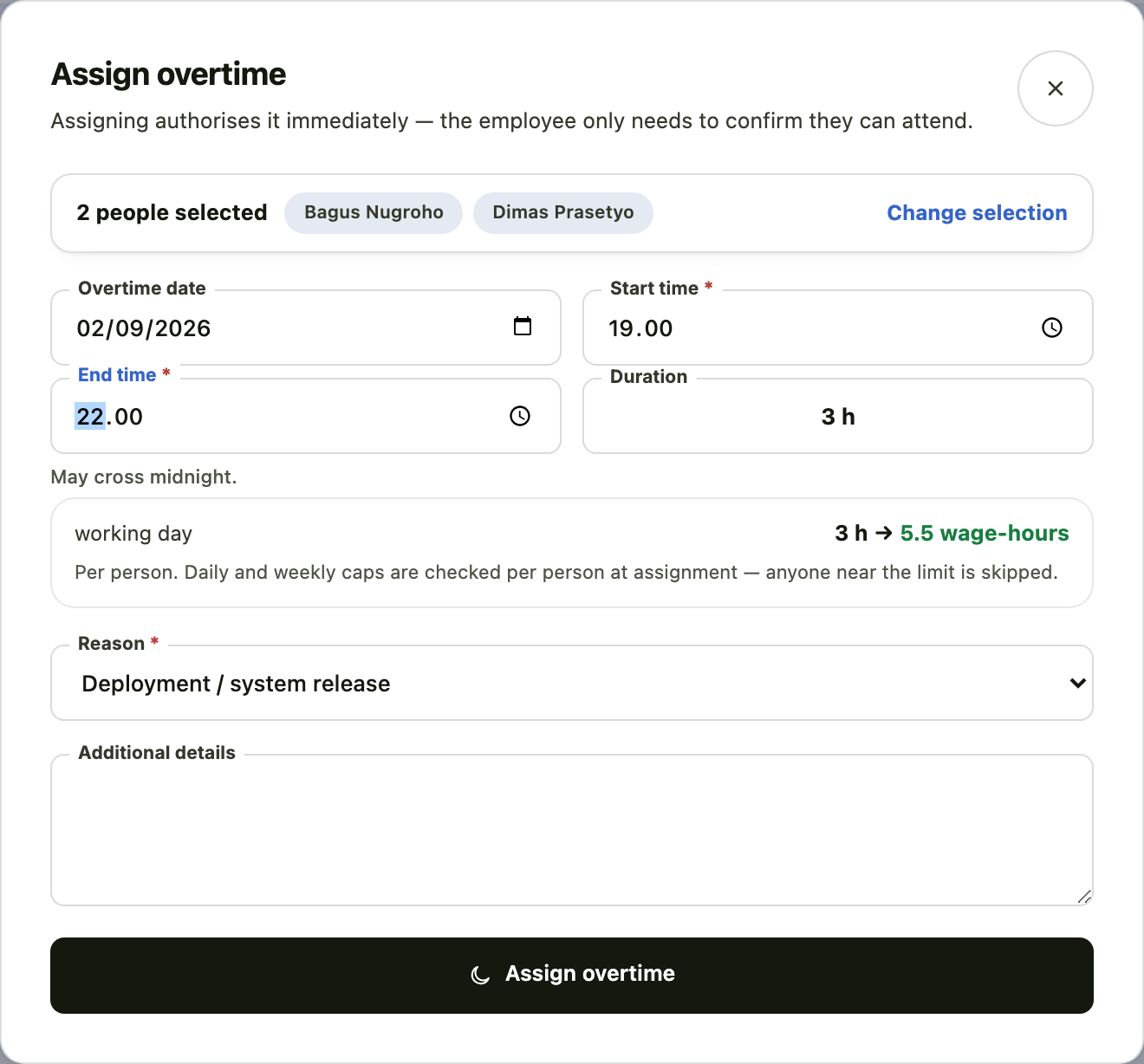
The manager's side: assigning
The Assign overtime button appears on the Overtime & WFH page of anyone holding overtime-approval permission — right beside the New request button, not on a separate screen.
Click Assign overtime, then tick one or more direct reports from the list. Several at once works fine — useful for a weekend deploy or a month-end close that involves a whole team, not just one person.
Set the date and the start and end times — one time window applies to everyone selected. The pay preview appears as soon as the window is complete, exactly as it does when filing for yourself.
Pick a reason, then click Assign overtime to send it.
The result screen separates who was successfully assigned from who was skipped — with each one's reason, for instance already being close to the weekly overtime limit. Nobody is forced past a limit just for sharing a batch with someone else.
Why there is no second approval
Assigning is the authorisation — whoever may assign is the same person who may approve anyone's overtime, so asking them to approve their own assignment afterwards would only repeat the same step. What is left for the employee is simply confirming they can actually attend.
Who can be assigned
If your company's organisation structure is configured (see People chart), assignment is limited to direct reports only — picking someone outside that gets them skipped at submission. HR settings holders are exempt from this limit and can assign anyone in the company.
The employee's side: confirming
An assigned row shows a purple Assigned pill on the Overtime & WFH page of the employee it was assigned to — see the image at the top of this page. Two buttons appear:
| Button | Effect |
|---|---|
| Accept | The overtime moves to approved — it counts toward that month's payroll immediately, exactly like overtime approved through the Approval Center |
| Can't attend | Opens a short reason box (required), then sends the status back — the assigning manager is notified |
Confirming is not a formality
Before it is accepted, the overtime hours are already authorised but not yet counted for payment. If the employee has not confirmed yet, the overtime simply stays waiting — payroll does not count it until the status is genuinely approved.
Reconciliation: when the actual differs from what was approved
4 hours approved does not automatically mean 4 hours paid. The moment an employee clocks out, the system compares the approved overtime hours against the actual hours the attendance record shows for that day — at exactly the same point the existing Early Leave detection already runs. There are three possible outcomes:
| Situation | What happens |
|---|---|
| Actual = approved | Nothing changes. |
| Actual < approved (e.g. 4h approved, they left after 3h) | Automatically adjusted — paid according to the actual hours, no reason needed. Leaving overtime early is not a violation. |
| Actual > approved (e.g. 4h approved, they actually worked 6h) | Paid hours stay locked at 4h until a manager reviews the extra time. |
A small shortfall does not reduce pay
If the shortfall is within one rounding step of the organisation's overtime rounding rule (see "Rounding (minutes)" under Request Rules), paid hours round up to the full approved figure instead of being cut to the actual. 3h approved but only 2h47m worked, under a 30-minute rounding rule, still pays the full 3h — the 13-minute gap is smaller than one rounding step. Only once the shortfall exceeds one step does the paid figure actually drop to the true actual.
Why extra hours are not auto-paid
Overtime authorisation is a ceiling, not a payment guarantee. Auto-paying the excess opens the door to uncontrolled overtime cost; ignoring it outright is unfair when the overrun was genuine — a production incident that ran long, for instance. One review step is the middle ground.
The excess appears as a new Overtime reconciliation queue in the Approval Center, handled by anyone holding overtime-approval permission (not attendance permission). Two choices:
| Button | Effect |
|---|---|
| Extend | Paid hours are adjusted to the actual hours worked — the excess is counted in payroll too |
| Cap | Paid hours stay at the approved figure — the excess is not paid |
The outcome is visible directly on the request row itself, for both the manager and the employee — "Actual: 6 hours — extended in full" or "Actual: 6 hours — paid 4 hours as approved".
A case this does not cover
Reconciliation only runs when there is a trustworthy clock-out record for that day. An employee assigned overtime who never clocks in at all is still paid the approved amount — that is an attendance problem (a no-show), not a reconciliation problem, and needs to be handled through that day's attendance record instead.
Working from home
| Field | Required | Note |
|---|---|---|
| Start & end | ✔ | May span several days |
| Reason | ✔ |
Request WFH before the day, not on the day
Clocking in with WFH mode only unlocks after an approved WFH request exists for that date.
If you submit it that morning and your manager has not yet decided, you cannot clock in as WFH — and clocking in from home as "Office" will be refused for being outside the radius.
Common problems
| Message | What it means | What to do |
|---|---|---|
| Start time earlier than policy | The company sets a time after which overtime counts | Adjust the start time |
| Beyond the daily or weekly limit | Your overtime is already near the limit | Reduce the duration, or discuss it with your manager |
| Below the minimum increment | The company counts overtime in fixed increments | Adjust the duration |
| WFH mode unavailable at clock-in | No approved WFH request for that day | Submit the WFH request first |